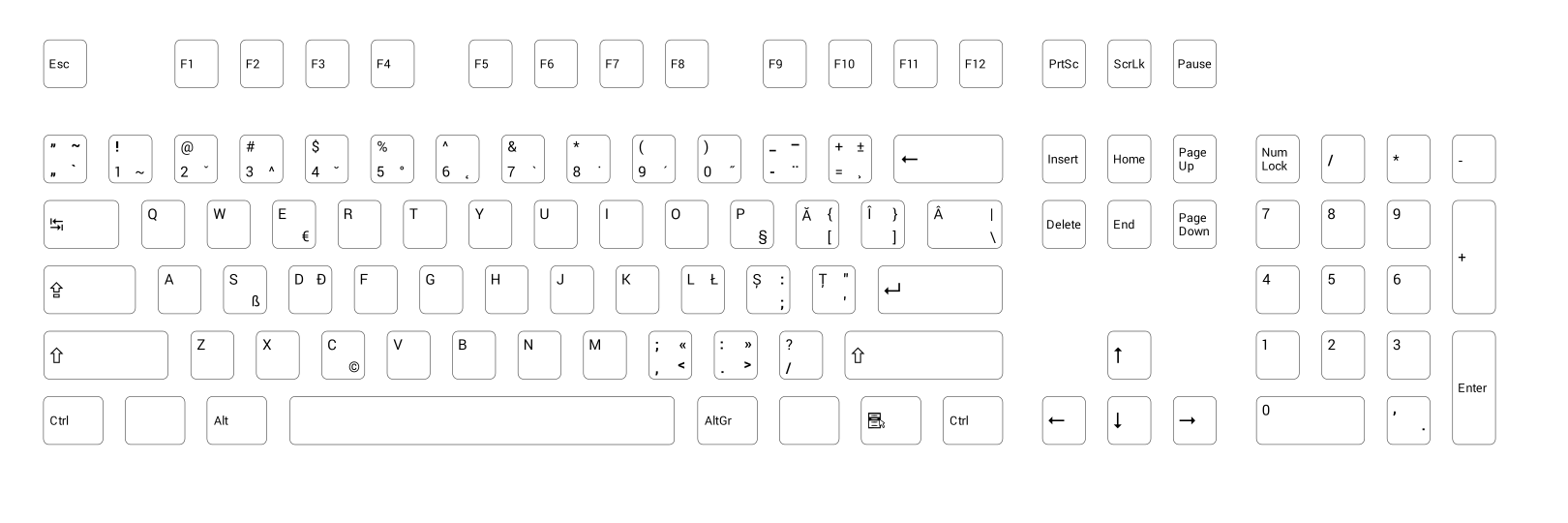
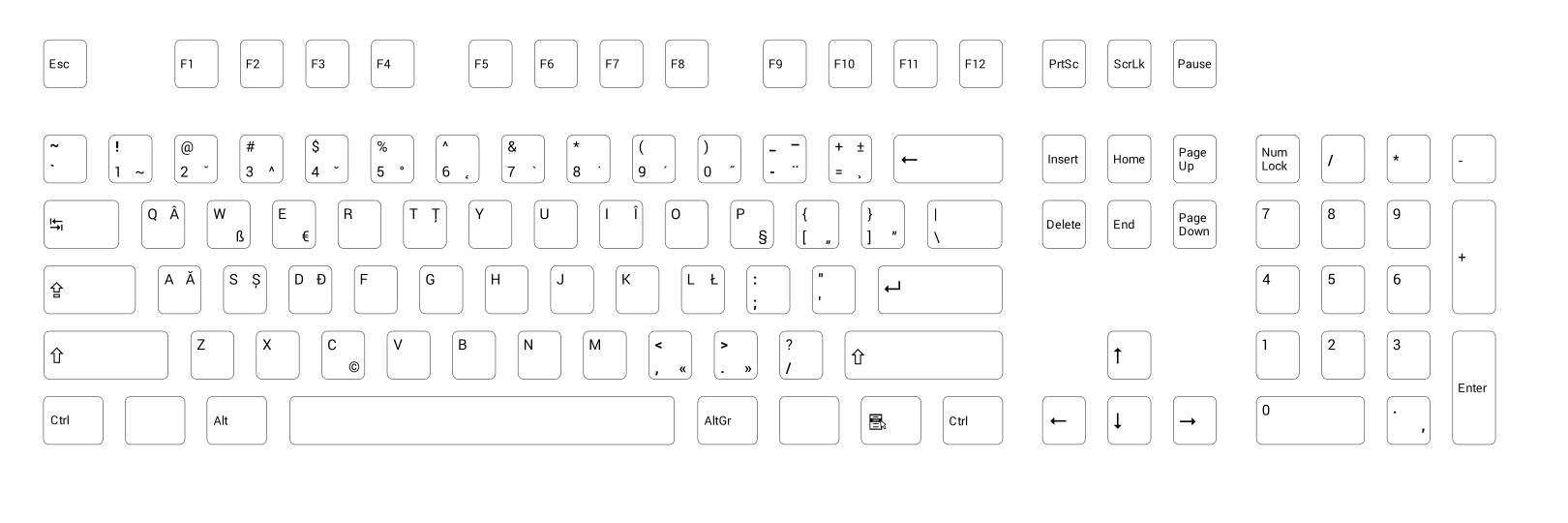
2012-08-30

MSI + Unicode ≠ Love

I was upgrading my Libre Office installation to version 3.6.1 when I've noticed the question marks in the installer UI:


How can this be? Ș and ț (s and t comma below) characters are present in the Microsoft Sans Serif and Tahoma fonts since Windows 2000.

The only explanation is: ANSI installation program. No way! You would think that Windows Installer would be Unicode, but it's not! Michael Kaplan wrote about this weirdness seven years ago: MSI Databases and Unicode?

WiX also states on their help page: „Top-level elements like Product, Module, Patch, and PatchCreation support a Codepage attribute. You can set this to a valid Windows code page by integer like 1252, or by web name like Windows-1252. UTF-7 and UTF-8 are not officially supported because of user interface issues. Unicode is not supported.”

Programs like 7-zip use MSI for x64 target because NSIS installer did not have support for x64. NSIS officially doesn't support Unicode and x64, but there are forks which do (Unicode fork, x64 fork).

I've filed a bug (#54232) for LibreOffice. I guess they will use the old ş and ţ (s and t cedilla) characters to fix this problem.

Windows 95 End of Life was 1st of January 2003, Windows 98, Windows 98 Second Edition, and Windows ME End of Life was 1st of April 2007.

They haven't fixed this problem even though is has been five years since they do not support any ANSI operating system.

2012-08-18

Qt Creator Visual C++ keyboard shortcuts

Qt Creator comes with a "MS_Visual_C++.kms" keyboard shortcuts scheme. But this scheme is not based on Visual C++ Professional, but instead of Visual C++ Express.

The two versions Visual C++ Professional and Visual C++ Express do not have the same keyboard shortcuts scheme. You can download the default keyboard scheme for Visual Studio 2010 C++ here.

If you have used Visual C++ Professional with Visual Assist you will also notice that the Visual Assist shortcuts are also missing. Visual Assist default shortcuts can be viewed here.

Visual C++ allows multiple shortcuts for the same command. Unfortunately Qt Creator doesn't allow this and at times I had to choose from multiple shortcuts only one.

Below is a table with the updates to the "MS_Visual_C++.kms" keyboard shortcuts scheme:

Command Label Shortcut Old Shortcut
Toogle Toggle Bookmark Ctrl+F2 Ctrl+K, Ctrl+K
OutputPane.nextitem Next Item F4 F6
OutputPane.previtem Previous Item Shift+F4 Shift+F6
VisualizeWhitespace Visualize Whitespace Ctrl+Shift+8 Ctrl+E, Ctrl+V
LowercaseSelection Lowercase Selection Ctrl+U Alt+U
UppercaseSelection Uppercase Selection Ctrl+Shift+U Alt+Shift+U
Sidebar.Projects Activate Projects Pane Ctrl+Alt+L Alt+X
Sidebar.Class View Activate Class View Pane Ctrl+Shift+C
AddNewFile Add New... Ctrl+Shift+A
AddExistingFiles Add Existing Files... Alt+Shift+A
RunToLine Run to Line Ctrl+F10
AttachToLocalProcess Attach to Running Local Application... Ctrl+Alt+P
FindUsages Find Usages Alt+Shift+F Ctrl+Shift+U
RenameSymbolUnderCursor Rename Symbol Under Cursor Alt+Shift+R Ctrl+Shift+R
Methods Methods and Functions Alt+Shift+S
Methods in current Document Methods in Current Document Alt+M
JumpToDefinition Follow Symbol Under Cursor Alt+G Ctrl+F12
SwitchDeclarationDefintion Switch Between Method Declaration/Definition Ctrl+F12 Ctrl+Shift+F12
SwitchHeaderSource Switch Header/Source Alt+O F4
Files in current project Files in Current Project Alt+Shift+O
CancelBuild Cancel Build Ctrl+ᡀ�

Cancel Build should have been Ctrl+Break. I filed this behavior as Qt Creator Bug #4609.

The complete "MS_Visual_C++_Visual_Assist.kms" can be downloaded from here. With these keyboard shortcuts Qt Creator is a able to pose as a very good substitute to Visual C++ and Visual Assist!

2012-08-05

Romanian diacritic marks in movie subtitles

One important "screen" is the TV screen. In Romania the movies are not dubbed, they are subtitled. This means that all dialogs are presented as text for the viewer to read and understand the movie.

I remember I wanted to learn how to read because I wanted to read the movie subtitles.


Television


By using www.cool-itv.net, which uses P2P SoapCast tehnology to distribute cable TV stations I was able to analyze which Romanian diacritics were used in movie subtitles.

Below you will see some screenshots of some TV stations:

Almost all of the TV stations used the old diacritics - S and T cedilla (şŞţŢ) - with the exception of the last one which uses the correct diacritics - S and T comma below (șȘțȚ).

The state-owned public TV broadcasters (TVR1, TVR2 and so on) did their homework and their software can handle Unicode characters and they are using the correct Romanian diacritics. Chapeau!

At least some of them use the same diacritic: Discovery, Animal Planet, ProTV, Pro Cinema, and they did not mix s cedilla with t comma below like HBO, Antena1, and Kanal D.

One interesting case was TCM which used  A Caron (ǎ) instead of A Breve (ă). Also Prima used A Tilde (ã) in their promotional clips.

The usage of the old diacritics is due to the fact that the specialized TV software used is some old software written before Microsoft started promoting Unicode.

Old software and subtitle standard from 1991 is responsible to the major usage of incorrect Romanian diacritics. The 1991 standard is the EBU (European Broadcasting Union) TECH. 3264-E  which doesn't support Unicode characters.

Hopefully all this will change with the arrival of the new EBU-TT Subtitling Specification which was announced on 31st of July 2012. In a couple of years all TV stations will be using the correct Romanian diacritics.

AVI / MKV Movies


The same grim story is presented in the underground movie subtitles scene, for example if you go to http://www.opensubtitles.org/ro and download for example Iron Sky Romanian subtitle you will get only Windows-1250 codepage subtitles. By the way Iron Sky is a cool movie :)

Nobody uses Unicode to encode the subtitles, which would not require the user to configure their media player of choice to Windows-1250 / Central European / ISO-8859-2 as default code page for subtitles.

I've created a small Windows tool (133KBytes) which automatically converts subtitles from old diacritics to correct diacritics. The tool can be downloaded from here.

Below you have a screen shot of the tool:

I hope Unicode subtitles will be more popular in the future. There is no need to stick to ANSI code pages!

2012-06-18

Portable qmake

According to Wikipedia qmake "is an utility that automates the generation of Makefiles [...] It integrates with the Qt framework"

You can also use it without Qt though, this is achieved by adding the following line CONFIG -= qt in the *.pro file.

In order to use qmake in a portable way one needs to:
  1. Copy the qmake executable, which is statically linked, into a folder named bin
  2. Create a qt.conf file near to qmake.exe containing just the following:
  [Paths]
  HostPrefix=..
  3. Copy the mkspecs folder

I have copied all the above in C:\Program Files (x86)\qmake-2.01a\ and put a qmake.cmd in a bin folder which I have in path. Zipping the above folder generated an qmake-2.01a.zip which is just 996 KB in size.

qmake.cmd is nothing more than just: @"c:\Program Files (x86)\qmake-2.01a\bin\qmake.exe" %*

qmake isn't just an utility that automates the generation of Makefiles it can also generate Visual C++ project files. This is as easy as running: qmake -tp vc

You can find all that qmake can do in the qmake Manual.

You can also use qmake without knowing too much about it, it can generate a project (pro) file from existing code.

Let's say you have this hello.cpp

#include <windows.h>

int __stdcall WinMain(HINSTANCE, HINSTANCE, LPSTR, int)
{
     ::MessageBox(0, L"qmake works!", L"info", MB_OK | MB_ICONINFORMATION);
     
     return 0;
}
 
  1. Put this hello.cpp in a test folder
  2. Type qmake -project, which will generate a test.pro file
  3. Edit test.pro and add CONFIG -= qt
  4. Type qmake -tp vc, which will generate a Visual C++ project file

There you have it, starting from a cpp file and ending up with a Visual C++ project file in three easy steps!

By running release\test.exe on a Windows 7 you will see the following:

The release\test.exe has 7KB. Let's say I want to deploy this executable on other machines, do I have some dependencies? By using dumpbin we can answer this question.

$ dumpbin /imports test.exe | findstr ".dll"
    USER32.dll
    MSVCR90.dll                   96 __dllonexit
    KERNEL32.dll

How do we get rid of the MSVCR90.dll dependency? It seems this is as complicated as editing a text file, namely qmake-2.01a\mkspecs\win32-msvc2008\qmake.conf.  And there change -MD and -MDd into -MT and -MTd. Now release\test.exe has increased to 41KB but there is no MSVCR90.dll dependency.

If you don't feel comfortable with editing this "system" file, you can copy it and then include the modified qmake.conf file in your pro file. Or you can use the "-spec" command line parameter to point qmake to the modified qmake.conf file.

As you can see qmake is very flexible and it can accommodate to a large number of compilers, just have a look in mkspecs folder.

If you like qmake, you will also like jom - the parallel make tool for Windows, which can be obtained from here.

2012-04-19

(ro) Tastaturi românești II

În articolul Tastaturi românești am trecut în revistă oferta marilor firme de calculatoare Dell, HP, Lenovo, și Acer cu privință la tastatura românească.

Nici una din marile firme nu avea în ofertă o tastatură conformă standardului românesc  SR-13392:2004, standard implementat de Microsoft o dată cu Windows Vista.

În articol nu am analizat și oferta firmei Fujitsu, cu toate că am menționat că Fujitsu Siemens avea în ofertă o tastatură cu primul standard românesc de tastatură SR-13392:1998.

Ei bine firma Fujitsu are în ofertă o tastatură conformă standardului românesc SR-13392:2004, și anume KB400 RO, pe numele ei complet S26381-K551-L433. Tastatura KB400 RO poate fi cumpărată de la 8.33€ conform geizhals

Pe forumul sitului secarica.ro dorin a publicat câteva poze cu această tastatură, poze pe care le-am inclus mai jos:


Chiar dacă observăm că tastatura are ș și ț cu sedilă și că ă-ul nu are căciulița prea rotundă, avem de-a face cu o tastatură conform standardului, poate firma Fujitsu va corecta acest sughiț într-o versiune ulterioară.

Din păcate avem de-a face doar cu aranjamentul primar, nu și cu cel secundar (cel care generează diacriticele ținând apăsată tasta AltGr), aranjament pe care eu îl prefer.

Nu ne rămâne decât să ne înclinăm în fața firmei Fujitsu, prima mare firmă de calculatoare care produce tastaturi conform standardului românesc!

P.S.  Cristian Secară a observat că tastatura Fujitsu de mai sus este conformă cu primul standard românesc de tastatură, și anume cu SR-13392:1998, și nu cu cel din 2004.

Principala diferență față de cel din 2004 este că ; și : sunt accesibile doar cu AltGr pe pozițiile din US English (iar în cel din 2004 sunt și cu Shift pe , și . în detrimentul < și >), iar ghilimelele românești sunt pe nivelul 3 și 4 (iar în cel din 2004 pe nivelul 1 și 2 în detrimentul ` și ~). În rest în 2004 sunt doar completări sau precizări, nu modificări.

Cele de Siemens/Fujitsu au și ceva în plus față de standardul strict din 1998, anume accentele de tip tastă moartă (mai puțin pe 0). Cea de la Fujitsu văd că are și o problemă, anume Alt din dreapta scrie doar Alt (în loc de AltGr ca la orice tastatură europeană).
Destul de jenant ca după opt ani de la publicarea standardului, nu există o firmă care să aibă în ofertă tastaturi conforme cu standardul SR-13392:2004 (ambele aranjamente), mai ales că tastaturile conforme aranjamentului secundar (Romanian Programmers) pot înlocui cu succes toate tastaturile English-US existente pe piața românească.

Ca exercițiu deschideți linkurile de mai sus în două file/taburi și alternați între ele, nu există nicio diferență în afara faptului că AltGr este Alt în aranjamentul English-US.

Actualizare Octombrie 2013

Pentru cei care își doresc o tastatură Română Standard sau Română Programatori și sunt dispuși să plătească un pic mai mult (~170€) le recomand să citească articolul Tastatura RO-PRO. Pe scurt este vorba de o tastatură mecanică WASD la comandă. Tastatura este superbă, o recomand cu căldură.

2012-03-23

(ro) Kmkz sunt în față!

Săptămânalul Kamikaze și-a schimbat înfățișarea în mediul electronic. Am făcut câteva teste pe tableta HP TouchPad rulând Android 2.3 (Cyanogen Mod).

Android este unul dintre sistemele de operare, foarte utilizate pe dispozitivele mobile, care nu poate afișa ț-ul cu virgulă.

Săptămânalul Kamikaze este unul dintre singurele săptămânale scrise în preponderență cu diacriticele corecte (ș și ț cu virgulă). Versiunea precedentă a ediției online se vedea astfel (în Firefox):


Se pot observa cu ușurință pătrățelele de unde lipsește ț-ul. Varianta actuală arată astfel (tot în Firefox):


Noua variantă arată cu mult mai bine, aproape perfect dacă n-ar fi fost pătrățelele din colțul stânga jos.

Dar de ce se văd restul de ț? Kamikaze este primul săptămânal din România care folosește tehnica @font-face de afișare a diacriticelor, tehnică pe care am descris-o în articolul Browsere Moderne II (29.04.2010), tehnică care implică descărcarea unui font de pe situl Kamikaze și folosirea lui de către browser pentru a randa pagina.

Kamikaze folosește familia de fonturi Futura. Mai jos avem un fragment din codul CSS:
@font-face {
  font-family: 'FuturaRoCEPlain';
  src: url('fonts/futura/futuraroce-webfont.eot');
  src: url('fonts/futura/futuraroce-webfont.eot?#iefix') format('embedded-opentype'),
    url('fonts/futura/futuraroce-webfont.woff') format('woff'),
    url('fonts/futura/futuraroce-webfont.ttf') format('truetype'),
    url('fonts/futura/futuraroce-webfont.svg#FuturaRoCEPlain') format('svg');

  font-weight: normal;
  font-style: normal;
}
Capturile de ecran de mai sus au fost făcute cu Firefox 10.0.3. Am testat și alte browsere, precum:

Browserul implicit cu care vine Android 2.3 (bazat pe motorul Webkit):
 
Dolphin 7.6.0 (bazat pe motorul Webkit)


Opera 12.00

La browserele de mai sus s-a afișat inițial versiunea mobilă a saitului, versiune care nu vine cu o protecție la diacritice, și ț-ul lipsă lovește din plin. În principiu versiunea mobilă a unui sait este o versiune mult mai „ușoară”, pentru a fi descărcată repede peste o conexiune 3G.

Pentru versiunea mobilă s-ar fi putut folosi tehnica de detecție a diacriticelor problematice prezentată în articolul Diacriticele și internetul (30.10.2010). Scriptul diacritice.js (varianta „compilată”) are doar 1.5KB, față de futuraroce-webfont.ttf care are 24KB în mărime.

Se pare că Opera este singurul browser care a respectat directiva @font-face peste tot, nu se văd pătrățele deloc în varianta „desktop”.

Am menționat faptul că săptămânalul Kamikaze este scris în preponderență cu diacriticele corecte deoarece există și articole scrise cu diacriticele vechi. Vezi captura de ecran de mai jos:


Diacriticele vechi nu au fost incluse în fontul FuturaROCE și ele sunt „emulate” folosind un alt font, iar rezultatul este urâțel pe mașina mea cu Windows 7.

Diacriticele vechi sunt introduse de obicei cu aranjamentul de tastatură „Legacy” din Windows (prezent de la Windows 3.11 încoace)  Pentru cei familiarizați cu acest aranjament am creat un aranjament identic, dar care are diacriticele vechi schimbate cu cele noi.

Pachetul de instalare universal pentru Windows XP, Vista, 7, 32 sau 64 de biți, poate fi descărcat de aici: legacy_fixed (202 KB). Pachetul de instalare este semnat digital, pentru mai multă siguranță :)
Am creat acest aranjament de tastatură folosind Microsoft Keyboard Layout Creator 1.4, iar dezinstalarea se face din „Control Panel -> Add Remove Programs” și acolo căutați după „Romanian (Legacy) - Fixed”.

Kamikaze sunt în fața competiției și sper să dea un exemplu presei online românești! Textele se scriu cu diacriticele corecte în Web 2.0!

P.S.

Am făcut un filmuleț în care prezint instalarea „progrămelului” legacy_fixed.exe pe un Windows XP fără fonturile actualizate.


2012-03-05

Windows 8 Consumer Preview and the Romanian Language

In this blog entry I will present a few issues gathered in a short test drive of Windows 8 Consumer Preview. If you are not interested in these Romanian issues, please stop reading here :)

The fonts

In the blog entry named Windows 7 and the Romanian Language I've did a bit of nit picking regarding the font families found on Windows 7.

As it turns out, Microsoft didn't fix the font family problems in Windows 8 Consumer Preview. Bad.


The language shortened name

Windows 7 had the Romanian language shortened to "RO", which was perfectly fine. Windows 8 has the Romanian language shortened to "RUM". This came a bit of a shock even though I knew the German translation, namely "Rumänisch".


"RO" short name was standardized by ISO 639-1. "RUM" short name was standardized by ISO 639-2, standard which was based on the MARC Code List for Language of the Library of Congress. There is also a ISO 639-3 standard which has Romanian shortened to "RON", but that's not good either, since the Romanian currency is also shortened to "RON".

If you ask any Romanian how should (s)he shorten the name of the Romanian language (limba Română), (s)he will say "ROM". As it turns out, "ROM" is also present in the ISO 639-2 standard, it marks the shortened form of Romany language.

This is not Microsoft's fault, but I think "RON" is better than "RUM". Baddish.

Retro translations


If you ask anybody from Microsoft which characters (şţ cedilla or șț comma below) should be used in Romanian translations, they will point you to this web page and they will correctly say that the comma below characters are to be used. I've seen such a discussion between Nokia and Microsoft.

But then why is the bing page above translated with the old cedilla characters? I can think of two possibilities:
  1. They've outsourced the translation to a firm which uses the Windows Legacy Romanian keyboard layout (like since Windows 3.11)
  2. The usage of the old cedilla characters was intentional because of problems on some operating systems which have problems displaying the new comma below characters (Android prior to version 3, Windows XP with IE6, WebOS etc)
I wish Microsoft would remove the Legacy keyboard layout in Windows 8. How long will it be supported? At least please change the şţ cedilla characters with the șț comma below characters in the Legacy keyboard layout

The latter problem can be fixed by using a small piece of Javascript code to detect if  the width of "stST" string is the same as the width of the "șțȘȚ" string. If they are the same width then the browser can display the new comma below characters. If not, then it means that the browser is using a different font to substitute the characters, or it is using empty square characters, in which casejust replace the correct comma below characters with the more portable cedilla characters.

I've presented this Javascript detection technique in this blog entry (Romanian): Diacriticele și Internetul. The MIT licensed Javascript code is located here.

Retro translations? Bad

Maps


Besides the fact that the old cedilla ţ is being used in "Constanţa", there is nothing wrong with the page. This is good, it used to be wrongly rendered a month ago. Fixed rendering? Good.

Thank you Microsoft, please correct the map data so that you are using the correct comma below characters. Old characters? Bad


We'll see how Windows 8 RTM will look like in a couple of months.

2011-10-31

(ro) Algoritmi Fundamentali – O perspectivă C++

Ne aducem aminte de algoritmi de obicei în preajma vreunui interviu, și atunci vrem ceva rapid și concis.

În limba română sunt puține cărți care abordează această temă. Iar cele accesibile gratuit sunt și mai puține.

O carte accesibilă gratuit este: Algoritmi Fundamentali – O perspectivă C++ publicată de Răzvan Andonie și Ilie Gârbacea la editura Albastră în 1995.

Din păcate varianta accesibilă gratuit suferea de un mic defect – diacriticele lipseau cu desăvârșire.
Eu țineam minte că atunci când am răsfoit cartea nu am avut nicio problemă în a o citi.

După un mic dialog cu d-l Răzvan Andonie am aflat că varianta publicată într-adevăr avea diacritice, iar cea online nu. M-am oferit în a ajuta la restaurarea diacriticelor:

Cartea, erata și codul sursă al programelor C++ sunt accesibile de pe pagina d-lui Andonie. Versiunea fără diacritice mai poate fi găsită pe vechea pagină a d-lui Andonie.

2011-08-21

Windows 7 and the Romanian language

Starting with Windows Vista, Romanian language became properly supported on Windows: two new keyboard layouts were added, and font families were updated to include S comma below and T comma below characters.

Unfortunately some older fonts have some problems with S-comma below and T-comma below characters, comma is not below the S and T letter, is part of the letter. This happens also on Windows 7.

The two characters are part of Unicode's "Latin Extended-B":

I have done a simple test, to see how many fonts (from the Latin Windows fonts) have the S and T comma below characters with actual comma below symbol.

The simple test consists in a webpage rendered Internet Explorer 8 and 9 on Windows 7 with normal font size (96dpi) and with large font size (120dpi).

The test includes besides the Romanian characters (ĂÂÎȘȚăâîșț) also the "deprecated" S and T cedilla characters (ŞŢşţ) and S and T dot below characters (ṢṬṣṭ).

Test pages and screenshots for Internet Explorer 8, 9 and Firefox 5 can be found here. The results for 96dpi are presented below:
"Franklin Gothic Medium" is the only font which does not have S and T comma below characters.
"Tahoma", "Segoe UI" and "Microsoft Sans Serif" have S and T dot below characters which have the dot separated for the 9pt and 8pt font sizes, which is not true for S and T comma below characters.

The same test pages on Windows 7 with large fonts (120dpi) displayed correctly the comma for all fonts (except Franklin Gothic Medium).

Internet Explorer 9 comes with a new font renderer (using DirectWrite and Direct2D APIs) which reveals another problem with the S and T comma below characters. The comma below from S is different from the one under T, as seen in the images below:

Tahoma has a problem with A-Breve (ă), in the bold form, breve is slightly shifted to the right:


S and T cedilla characters, even tough not correct from the Romanian language point of view, are still heavily used in many documents / web pages etc. It is important that the cedilla should be drawn the same for S and T. This is not true for all Windows 7 fonts.

Firefox starting with version 4 includes locale dependent text rendering, which means that if you have the Romanian locale set the S and T cedilla characters will be automatically rendered with S and T comma below characters. Not all the Windows 7 fonts come with this locale information. Read more about this feature on Wikipedia.

The results for S and T cedilla are illustrated below:

As you have seen there is room for improvement when it comes to Romanian language support on Windows.

2011-07-29

Starting development with Qt on Windows

The general advice when it comes to start develop using Qt on Windows is to download the Qt SDK. The offline version has 1.7 Gbytes and you can start developing for Desktop (using MinGW or Visual C++ 2008 Express or higher), for Symbian ^1 or ^3 devices, or for MeeGo devices.

People usually complain about the size of the offline Qt SDK. In comparison Visual Studio 2008 Standard Edition (x86) - DVD (English) has 2,8 Gbytes.

Even though the offline Qt SDK has 1.7 GBytes, it doesn't include everything. The precompiled Qt demos are not included in Qt SDK. They are available though through the individual Qt Library installers, or more explicitly Qt libraries 4.7.3 for Windows (VS 2008, 228 MB).

After installation one can use Qt Creator to develop applications. I won't go into much detail here, one can browse through the official documentation - Qt Creator Manual 2.2.1

I'm going to describe how you can compile from command line programs for Desktop - MinGW, Visual C++ 2008, and for Symbian^3.

First we need to get a small "Hello World" example. Google pointed out at Qt 4.3: Qt Tutorial 1.
We need to start up a text editor and paste:
#include <QApplication>
#include <QPushButton>

int main(int argc, char *argv[])
{
    QApplication app(argc, argv);

    QPushButton hello("Hello world!");
    hello.resize(100, 30);

    hello.show();
    return app.exec();
}

From Start Menu -> All Programs -> Qt SDK -> Desktop you can start the command prompt for "Qt 4.7.3 for Desktop (MinGW)". Unfortunately it lands into c:\windows\system32

Since I already use Total Commander for my file browsing I've decided to copy the properties from the Qt Command Prompts into Total Commander's Start Menu.

If we do not specify a "Start path" for an entry in Total Commander's Start Menu, Total Commander will use the current directory as start path, which together with a hot key will free me from useless mouse clicking and of some typing.

"Qt 4.7.3 for Desktop (MinGW)" is a shortcut for "C:\Windows\System32\cmd.exe /A /Q /K C:\QtSDK\Desktop\Qt\4.7.3\mingw\bin\qtenv2.bat". Copying the command line into Total Commander's Start Menu looses one functionality - the title of the command window becomes "c:\windows\system32\cmd.exe" compared with the Qt SDK's "Qt 4.7.3 for Desktop (MinGW)". This can be easily fixed by appending "title Qt 4.7.3 for Desktop (MinGW)" into "C:\QtSDK\Desktop\Qt\4.7.3\mingw\bin\qtenv2.bat".

Now that we have everything in place we can type into "Qt 4.7.3 for Desktop (MinGW)" command window the following commands (in the directory where we saved the "Hello World" source code):
qmake -project
qmake
mingw32-make

The result is presented bellow:

I've done the same for "Qt 4.7.3 for Desktop (MSVC 2008)". The commands to build the "Hello World" application are almost the same, but instead of mingw32-make, nmake is to be used with MSVC 2008.

But after running nmake the following message was displayed:
'nmake' is not recognized as an internal or external command, operable program or batch file.

This is due to the fact that "C:\QtSDK\Desktop\Qt\4.7.3\msvc2008\bin\qtenv2.bat" does not setup the MSVC 2008 compiler. In order to fix this append the lines to the qtenv2.bat file:
call "%programfiles%\Microsoft Visual Studio 9.0\VC\bin\vcvars32.bat"
title Qt 4.7.3 for Desktop (MSVC 2008)

For Symbian^3 instead of making a shortcut to cmd.exe and pass the batch file as argument, there is a shortcut to the batch file: "C:\QtSDK\Symbian\SDKs\Symbian3Qt473\bin\qtenvS3.bat", which in turn makes a call to cmd.exe. Exactly the opposite. Edit qtenvS3.bat and replace the last line "cmd /A /Q /K" with the lines:
popd
title Qt 4.7.3 for Symbian^3 Command Prompt

Compiling the "Hello World" sample for Symbian^3 goes like this (helloqt.cpp needs to be on the same drive where Qt SDK was installed, e.g. c:\):
qmake -project
qmake
make release-gcce
make sis

After installing helloqt.sis on device, the result looks like this (admittedly not a very good looking screen shot):


Compiling Qt applications from command prompt is important in cases in which we have to deal with configure scripts, or when we want to do things "old school" :)

I've opened up a bug report QTSDK-802 with the issues presented in this blog entry.

2011-07-03

(ro) Firefox și diacriticele vechi și noi

Recent s-a lansat www.cațavencii.ro www.catavencii.ro, și pentru un sit nou nouț mi s-a părut înapoiată alegerea de a folosi diacriticele vechi cu sedilă, mai ales când există soluții tehnice pentru rezolvarea problemei pătrățelelor în navigatoarele mai vechi. Dar sedile din titlurile articolelor arătau foarte corect în Firefox.

Am făcut două capturi de ecran pentru Firefox 5 și Google Chrome 12 și le-am pus într-un gif animat:

Google Chrome afișa pagina cu sedile, precum Opera 11.50 și Internet Explorer 9.0. Inițial am crezut că este vorba de un bug și l-am raportat #668996, dar s-a dovedit că nu este un bug ci un/o „feature”!

Firefox începând cu versiunea 4 randează textul în funcție de limba aleasă pentru setările locale din sistem. Din păcate nu toate fonturile din Windows 7 vin cu această facilitate, asta explică de ce fontul „Times New Roman” din animația de mai sus și-a păstrat diacriticele cu sedilă.

Alte situri precum www.capisci.ro sunt desedilizate complet. Vezi articolul despre diacritice:


Cei de la capisci au această notă „Textul articolului este scris intenţionat cu semne diacritice greşite la literele ş şi ţ pentru a permite citirea lui de către aceia care probabil sînt cei mai interesaţi de subiect, adică aceia care văd pătrăţele în locul literelor corespunzătoare cu diacritice corecte.” :)

Pentru a preveni înlocuirea automată codul html trebuie să conțină indicații despre limbă precum lang="en".

În viitorul apropriat sistemele de operare vor avea toate fonturile actualizate și cel puțin Firefox va afișa internetul românesc corect!

Merită totuși menționat faptul că acest lucru se poate face acum cu ajutorul extensiei FoxReplace! Eu am ales să fac conversia manual, apăsând tasta F2. Puteți importa direct fișierul meu de configurare.