2013-10-12

(ro) Tastatura RO-PRO

Uneltele de calitate sunt foarte importante în orice domeniu de activitate. Pentru lucrul la calculator avem nevoie nu doar de un calculator performant cu multă memorie, disc dur sprinten, procesor cu cât mai multe nuclee și monitor cât un televizor, avem nevoie și de o tastatură bună.

Tastaturile mecanice sunt considerate cele mai bune tastaturi, au cursă lungă, rezistă la zeci de milioane de apăsări și fac zgomot când tastezi! Nivelul de zgomot depinde de tipul de contact mecanic folosit - Cherry Maro, Cherry Albastru, Cherry Negru, Cherry Roșu etc.

Până acum câteva zile am fost fericitul posesor al unei tastaturi Das Keyboard Ultimate Model S. Modelul S, S de la „Silent”, avea contacte Cherry Maro, iar „Ultimate” de la faptul că nu avea nimic inscripționat pe taste.

Tastatura fără simboluri a fost amuzantă de-a lungul timpului, mai ales cu colegii de muncă care încercau să vadă dacă pot scrie fără să se uite. Totuși am sesizat că mă uit la tastatură atunci când trebuie să apăs tastele funcționale F1..F12, sau „Print Screen”.

Decizia de a schimba tastatura a venit după ce am citit despre tastatura „Code” a lui Jeff Atwood. Nu, nu mi-am cumpărat o tastatură „Code”, ci am decis să-mi fac propria tastatură!

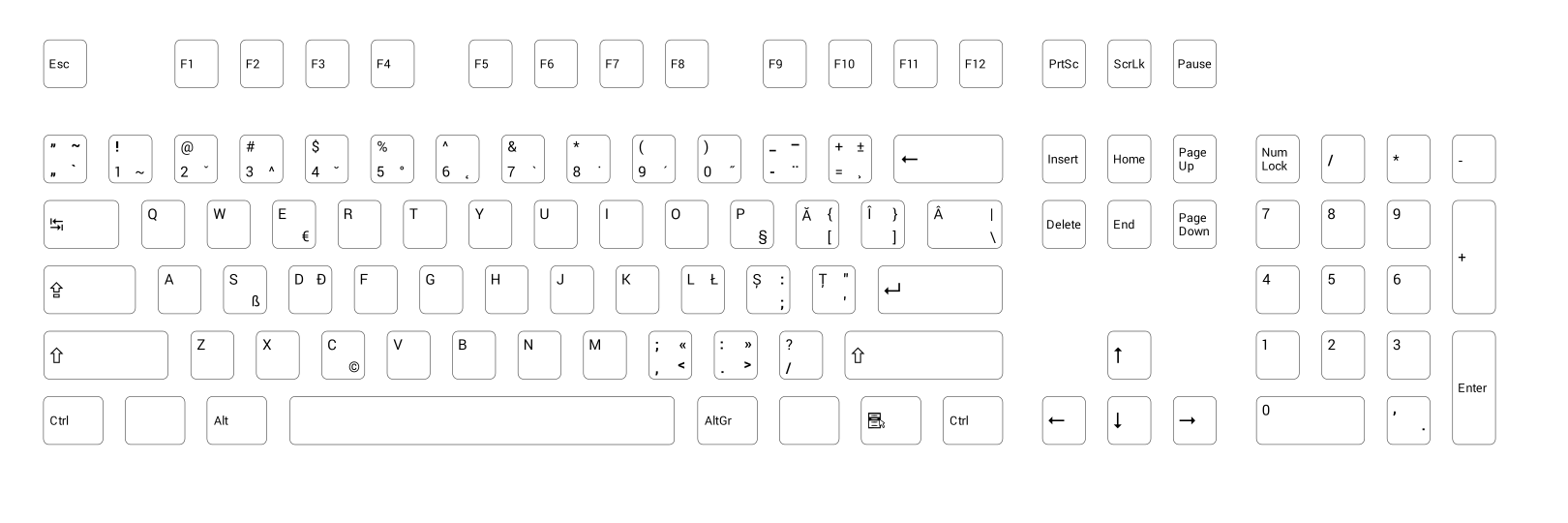
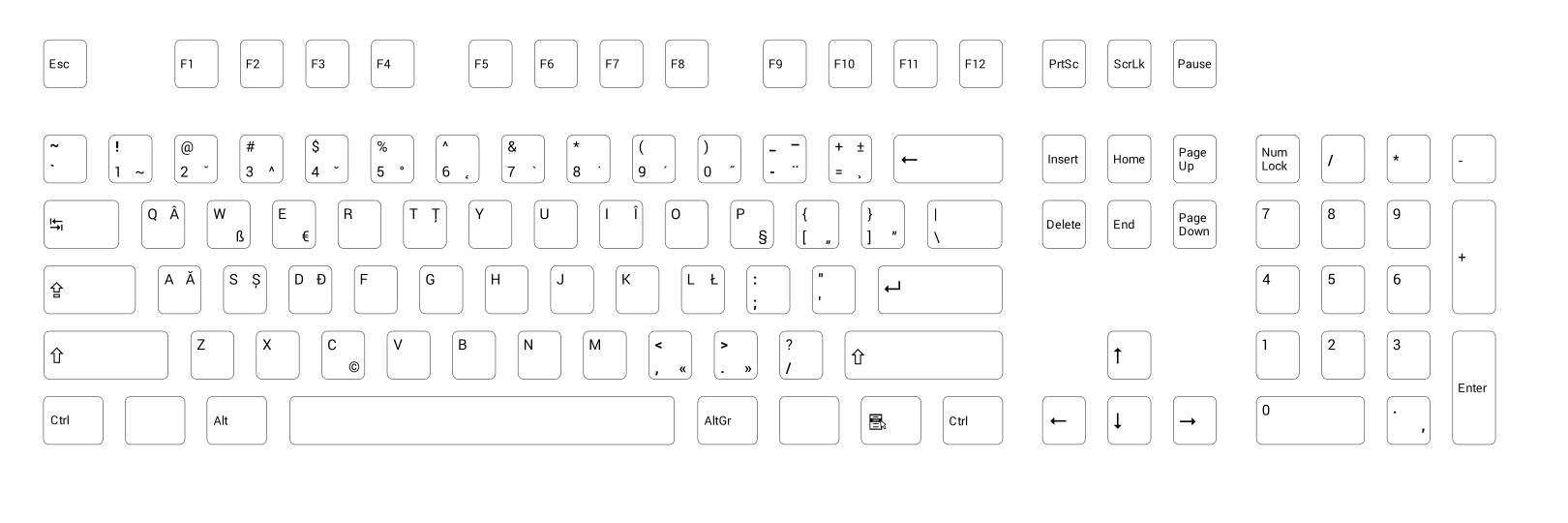
Eu la calculator folosesc doar configurația de tastatură RO-PRO (ROmână PROgramatori) în sistemul de operare fie el Linux, fie el Windows. Astfel mi-am zis că tastatura mea va avea aceeași configurație și pe tastatura fizică!

Am luat șablonul de tastatură de la WASD Keyboards, am pornit programul de editare grafică vectorială Inkscape și am început să-mi fac de cap.

Tastatura „Code” folosește fontul Helvetica pentru simboluri, șablonul WASD folosește fontul Arial, eu am decis să folosesc fontul Roboto. Am ales Roboto deoarece arată bine și pentru că Google l-a reparat în Android 4.3! Mulțumim Google!

Deoarece standardul de tastatură românească (ASRO SR13392:2004) conține două configurații de tastatură, am făcut șabloane pentru amândouă:
  • Română Standard (șablon SVG, previzualizare PDF)
  • Română Programatori (șablon SVG, previzualizare PDF)

Nu am zis nimic de WASD Keyboards. Ei se ocupă cu producerea de tastaturi mecanice la comandă. Clientul poate configura ce se va desena pe taste, ce culoare are fiecare tastă în parte, ce metodă de inscripționare a simbolurilor pe taste („Laser Etched” sau „Engraved”) și ce opțiuni de a face tastatura mai silențioasă.

Pentru a asculta diferențele de zgomot la diversele tipuri de contact mecanic, respectiv metodele de reducere a zgomotului, putem viziona acest videoclip pus la dispoziție de WASD Keyboards.

WASD Keyboards ne oferă de asemenea posibilitatea de a alege între o tastatură cu 104 taste și una cu 87 taste, diferența fiind dată de lipsa blocului numeric. Eu am ales varianta cu 87 taste deoarece am observat la Das Keyboard că blocul numeric era tot timpul prăfuit, asta pentru că rareori îl foloseam.

Pentru cei obișnuiți cu tasta Enter mare și cu tasta Shift stângă mică se poate alege între o tastatură cu 105 taste și una cu 88 taste. Din păcate nu există șabloane de editat la momentul scrierii acestui articol.

Tastatura mea RO-PRO arată astfel:


Pe spate putem observa niște comutatoare mici, comutatoare care modifică comportamentul unor taste. Aici avem o descriere a fiecărui comutator. De exemplu comutatorul patru dezactivează tastele Windows (tastele de lânga tasta Alt și AltGr, taste fără simbol în poza de mai sus).

Vă propun să faceți un experiment, deschideți un editor de texte (Notepad pe Windows), poziționați toate degetele deasupra tastelor 1, 2, 3, 4, 5, 6, 7, 8, 9, 0 și apoi apăsați-le pe toate deodată! Ce apare afișat pe ecran? Cu tastatura de la laptop la mine nu a apărut nimic, dacă am redus numărul de taste apăsate am reușit într-un final să văd „4321”. Cu tastatura WASD RO-PRO am văzut „1234576890”.

Toate bune și frumoase, dar cât costă? Nota de plată arată astfel:
  • Tastatura în sine - 149,99$
  • Contacte Cherry Maro - 5$
  • Transport - 46,80$
  • Taxa vamală (în Germania) - 22€

Prețul este un pic piperat (~170€). Alte tastaturi mecanice de „birou” cu contacte Cherry Maro au următoarele prețuri:

Tastaturile mecanice de „jucat” cu contacte Cherry Maro au următoarele prețuri:

Tastaturile de „jucat” vin cu iluminare prin tastă, caracteristică ce le face foarte utile pe întuneric. Aceeași caracteristică o are și tastatura „Code”, tastatură produsă de WASD. Din păcate la momentul actual nu se poate alege iluminarea prin tastă ca opțiune pentru tastaturile WASD la comandă.

WASD Keyboards estimează două săptămâni pentru transport, eu am primit tastatura fix după 14 zile!

Îi rog pe cei care dau comandă la tastaturi WASD Keyboards (varianta cu 87 taste sau 104 taste)  RO-PRO (șablonul în format SVG) sau RO-STD (șablonul în format SVG) să adauge un comentariu!

Pentru cei care comandă o tastatură RO-PRO de la WASD Keyboards și nu știu cum să o configureze în Windows 7, respectiv să afle la ce sunt utile tastele „moarte”, le recomand acest tutorial – Tastatura RO-PRO pe Windows 7.

2013-08-02

Thank you Google!

It's time to thank Google again for fixing the Android fonts in regards of the Romanian language (Android Issue 9808).

First time was for fixing the Droid font family and now for fixing the Roboto font family.

The fix came with the commit e68d87e0920133cb8799bc89abb8d1206c3d7750:
Update Roboto to version 1.200311

This updates Roboto to the latest version. This change should fix a
number of problems, including bug 7306377 (vietnamese o with horn), bug
6679075 (vietnamese u+1ee1), bug 7568194 (cyrillic yeru), and is also on
the critical path of bug 7291977 (t comma accent), bug 8278292 (E
ogonek) and likely others.
 In order to verify I had to get the fonts from the Android base git repository

git clone https://android.googlesource.com/platform/frameworks/base.git

This meant downloading a few hounded of megabytes, which in the end produced a "base" directory which was 1.9GB in size :)

Don't use the Google Fonts Roboto page, because there the font is not updated, as you can see from the screen shot below:


For your convenience you can download the whole Android fonts folder from here (12MB zip file)

I've opened the Roboto Thin font in Fontforge and as you can see T comma below is right where it should be:


This would make Android 4.3 the first Android with complete Romanian language support! w00t.

2013-03-16

Drive letters

Everybody knows that Windows has mapped letters for drives and partitions. c:\windows or c:\program files are familiar notions to Windows users.

There is a big probability that you have only two drives on your computer, C: as hard drive and D: as DVD/Blu-Ray drive. The days when one had A: and/or B: drive are long gone. A: and B: were reserved for floppy disk drives. These drive letters can be reused if ones goes to „Administrative Tools -> Computer Management -> Storage -> Disk Management”.

Here is one for you: Why doesn't Windows use A: and B: for USB flash drives? It doesn't do that even if it doesn't have other letters at disposal! This has proven to be a very effective way of disabling USB flash drives from being mounted, as seen below:


The USB flash drive was insterted but Windows couldn't mount it! No error message is being given to the user either. Nothing happens!

Starting with Windows Vista by default one cannot simply create files and directories on drive C:, you either disable the UAC (User Access Control) or comply with this rule.

I used to have my hard disk partitioned as C: for Windows and other programs and D: for my projects / files. But at times I would have less space on D: and I was forced to move data to C: drive. This was a bit annoying.

After installing Windows 8 on a fresh SSD drive I've decided to have only one partition and one fake one. I've substituted a directory for a drive letter. "subst c:\users\cristian\D d:" was the magic line.

In order to change the label of my new D: drive I had to create a registry key (HKEY_LOCAL_MACHINE\SOFTWARE\Microsoft\Windows\CurrentVersion\Explorer\DriveIcons\D\DefaultLabel) and then I had the label "Data" for D: as I used with my Windows 7 system:


Unfortunately Total Commander doesn't know about this trick and it displays the same drive label for D: as it does for C:

Soon I've noticed that my emulated D: drive was visible just for me, it was not usable for programs ran as Administrator. This turned to be a letdown, I had to run "subst c:\users\cristian\D d:" from a cmd.exe shell ran as Administrator. Couldn't be a way to run this script for both users?

Fortunately "Andres" had published on stackoverflow a solution to run a cmd.exe shell script as Administrator. His solution uses a hybrid shell script which is a valid cmd.exe shell script and also a WSH JScript.

Now I had a script which runs "subst c:\users\cristian\D d:" from my user and also from the Administrator user. Cool! I've put this script in the "Start Up" and now I have a fully functional D: drive!

@if (1==1) @if(1==0) @ELSE
@echo off&SETLOCAL ENABLEEXTENSIONS
>nul 2>&1 "%SYSTEMROOT%\system32\cacls.exe" "%SYSTEMROOT%\system32\config\system"||(
    @subst d: %USERPROFILE%\D
    cscript //E:JScript //nologo "%~f0"
    @goto :EOF
)
@subst d: %USERPROFILE%\D
@goto :EOF
@end @ELSE
ShA=new ActiveXObject("Shell.Application")
ShA.ShellExecute("cmd.exe","/c \""+WScript.ScriptFullName+"\"","","runas",5);
@end 

I like this solution. Now when I boot my machine I see UAC prompting me to run this script, which is also a nice way to inform me that my D: drive is mounted.

2012-11-27

Aranjamente de tastatură românească

Sau altfel spus: Cum scriu cu diacritice pe Windows?

Toată lumea știe că trebuie să mergi în „Control Panel” și să configurezi tastatura la „Regional Settings”. Acest lucru este foarte adevărat. Aranjamentul de tastatură „Romanian” de pe Windows XP a devenit „Romanian (Legacy)”/„Română (Tradițională)” pe Windows Vista/7/8.

Windows Vista/7/8 vin și cu aranjamente de tastatură conforme cu standardul românesc de tastatură SR-13392:2004, și anume „Română (Standard)”, respectiv „Română (Programatori)”.

Cum rămâne cu standardul românesc de tastatură SR-13392:2004 pentru Windows XP? Pentru Windows XP (și alte versiuni mai vechi) soluția vine de la Cristian Secară. Din păcate soluția oferită necesită urmarea multor pași manuali, pași care par complicați pentru utilizatorul de rând, obișnuit cu pachete de instalare „click, click, click”.

diacritice.ro oferă o soluție asemănătoare aranjamentului „Română (Programatori)”. Din păcate soluția folosește diacriticele cu sedilă și nu implementează toată funcționalitatea oferită de standardul de tastatură, și anume linia de dialog, tastele moarte cu ajutorul cărora putem introduce caracterele altor limbi: üäößéèçô etc.

Procedura de instalare a lui „rops.exe” de pe diacritice.ro este mai simplă decât la secărică.ro, dar tot necesită la final o vizită la „Control Panel”.

Nu se poate ceva și mai simplu, conform cu standardul românesc și cu diacriticele corecte?

Cu ajutorul programului Microsoft Keyboard Layout Creator 1.4 am realizat trei pachete de instalare pentru cele trei aranjamente de tastatură:
Aranjamentele „Română (Standard)” și „Română (Programatori)” sunt identice cu cele de pe Windows 7.

Cele două aranjamente conforme standardului românesc SR-13392:2004 sunt recomandate tuturor care acum vor să învețe să scrie cu diacritice. Eu personal folosesc aranjamentul „Română (Programatori)”, sau „Română cu Alt Dreapta”. Pentru cei familiarizați cu aranjamentul moștenit de la Microsoft le recomand aranjamentul „Română (Moștenit)”.

*Aranjamentul „Română (Moștenit)” vine cu următoarele modificări față de aranjamentul „Română (Legacy)” moștenit de la Microsoft:
  • Ş și ţ cu sedilă sunt înlocuite cu ș și ț cu virgulă
  • Ghilimelele „românești” pe prima tastă de pe rândul numeric ([,]), precum în aranjamentul „Română (Standard)”. Din păcate trebuie folosită tasta AltGr + [, respectiv AltGr + Shift + [ pentru a introduce: „”
  • Linia de dialog (–) pe AltGr + -
  • Tasta moartă ` (7) este activă, tastă cu ajutorul căreia se pot introduce caracterele: à, è, ù, ì, ò, À, È, Ù, Ì, Ò
  • Simbolul € pe AltGr + E
Notă: toate pachetele de instalare necesită drepturi de administrator. Windows XP necesită instalarea „Actualizării de fonturi corespunzătoare extinderii Uniunii Europene” pentru afișarea corectă a lui ș și ț cu virgulă.

Am făcut un film de prezentare a instalării aranjamentului „Română (Moștenit)”:

Windows XP


Windows 7


Pentru dezinstalare puteți fie să mergeți în „Control Panel” la „Add-Remove Programs” și de acolo să căutați „Română (Moștenit)”/„Română (Standard)”/„Română (Programatori)”, fie să rulați consecutiv pachetul de instalare.

Trebuie avut grijă doar ca aranjamentul să nu mai fie cel implicit în sistem, adică să instalați un alt aranjament de tastatură înaintea dezinstalării. Altfel mesajul de eroare poate fi foarte surprinzător pe Windows XP:


Acest articol a fost republicat aici: Aranjamente de tastatură românească.

2012-11-01

Tastatura Germano-Română pentru Windows 7

De obicei românii stabiliți în Germania folosesc aranjamentul german de tastatură. Un factor important este faptul că toate tastaturile vândute în Germania vin cu acest aranjament.

Limba română este scrisă fără diacritice, deoarece nu există vreo posibilitate de a introduce diacriticele românești.

Cu ajutorul programului Microsoft Keyboard Layout Creator 1.4 am realizat un aranjament Germano-Român (201 KB) care are în plus:
  • AltGr + A = ă/Ă
  • AltGr + S = ș/Ș
  • AltGr + T = ț/Ț
  • AltGr + I = î/Î
  • AltGr + W = â/Â
Acest aranjament seamănă foarte mult cu aranjamentul secundar al tastaturii române (cel pentru programatori). Singura diferență este că pentru â, am folosit tasta w deoarece tasta q este deja folosită cu AltGr, pentru a genera @.

Pentru a ilustra cum funcționează vedeți gif-ul animat de mai jos:
De aici puteți descărca aranjamentul germano-român de tastatură. Pachetul de instalare (201 KB) suportă Windows 32bit și Windows 64bit și ar trebui să funcționeze pe Windows XP, Vista, 7.

Tips & Tricks

Tastatura laptopului meu Dell nu are lângă tasta AltGr (Alt dreapta) decât tasta Ctrl. Alte laptopuri gen Lenovo vin cu tastaturi care au tasta meniu contextual lângă tasta AltGr, fapt care în practică dă dureri de cap celor care folosesc tasta AltGr pentru a scrie cu diacritice.

Tasta meniu contextual este relativ inutilă deoarece putem folosi combinația Shift+F10 pentru a activa meniul contextual, așa că o vom remapa ca tasta AltGr.

Pentru remapare am folosit programul KeyTweak. Mai jos avem o captură de ecran:


Mult succes în a scrie cu diacritice!

2012-08-31

Facebook + Unicode ≠ Love

The theme for the last days is the question marks instead of Unicode characters in various software products. In this case Facebook.

Facebook? Have you read this article written by Andrei Alexandrescu?

"The Best Programming Advice I Ever Got"

Coming back to question marks. I wanted to post a funny video on Facebook when I've noticed that Facebook gathered as description some undesired question marks:

If you go to the funny video (in Romanian) page you can see the caption as: „Primul șlagăr care te învață să scrii corect înjurăturile.”. No question marks there!

I'm sure there is an explanation why that happened... but it shouldn't have happened. Nobody said that Unicode is easy!

P.S. It seems Google+ does the same thing:

I was prepared to congratulate you Google on doing a better job than Facebook...

2012-08-30

MSI + Unicode ≠ Love

I was upgrading my Libre Office installation to version 3.6.1 when I've noticed the question marks in the installer UI:


How can this be? Ș and ț (s and t comma below) characters are present in the Microsoft Sans Serif and Tahoma fonts since Windows 2000.

The only explanation is: ANSI installation program. No way! You would think that Windows Installer would be Unicode, but it's not! Michael Kaplan wrote about this weirdness seven years ago: MSI Databases and Unicode?

WiX also states on their help page: „Top-level elements like Product, Module, Patch, and PatchCreation support a Codepage attribute. You can set this to a valid Windows code page by integer like 1252, or by web name like Windows-1252. UTF-7 and UTF-8 are not officially supported because of user interface issues. Unicode is not supported.”

Programs like 7-zip use MSI for x64 target because NSIS installer did not have support for x64. NSIS officially doesn't support Unicode and x64, but there are forks which do (Unicode fork, x64 fork).

I've filed a bug (#54232) for LibreOffice. I guess they will use the old ş and ţ (s and t cedilla) characters to fix this problem.

Windows 95 End of Life was 1st of January 2003, Windows 98, Windows 98 Second Edition, and Windows ME End of Life was 1st of April 2007.

They haven't fixed this problem even though is has been five years since they do not support any ANSI operating system.

2012-08-18

Qt Creator Visual C++ keyboard shortcuts

Qt Creator comes with a "MS_Visual_C++.kms" keyboard shortcuts scheme. But this scheme is not based on Visual C++ Professional, but instead of Visual C++ Express.

The two versions Visual C++ Professional and Visual C++ Express do not have the same keyboard shortcuts scheme. You can download the default keyboard scheme for Visual Studio 2010 C++ here.

If you have used Visual C++ Professional with Visual Assist you will also notice that the Visual Assist shortcuts are also missing. Visual Assist default shortcuts can be viewed here.

Visual C++ allows multiple shortcuts for the same command. Unfortunately Qt Creator doesn't allow this and at times I had to choose from multiple shortcuts only one.

Below is a table with the updates to the "MS_Visual_C++.kms" keyboard shortcuts scheme:

Command Label Shortcut Old Shortcut
Toogle Toggle Bookmark Ctrl+F2 Ctrl+K, Ctrl+K
OutputPane.nextitem Next Item F4 F6
OutputPane.previtem Previous Item Shift+F4 Shift+F6
VisualizeWhitespace Visualize Whitespace Ctrl+Shift+8 Ctrl+E, Ctrl+V
LowercaseSelection Lowercase Selection Ctrl+U Alt+U
UppercaseSelection Uppercase Selection Ctrl+Shift+U Alt+Shift+U
Sidebar.Projects Activate Projects Pane Ctrl+Alt+L Alt+X
Sidebar.Class View Activate Class View Pane Ctrl+Shift+C
AddNewFile Add New... Ctrl+Shift+A
AddExistingFiles Add Existing Files... Alt+Shift+A
RunToLine Run to Line Ctrl+F10
AttachToLocalProcess Attach to Running Local Application... Ctrl+Alt+P
FindUsages Find Usages Alt+Shift+F Ctrl+Shift+U
RenameSymbolUnderCursor Rename Symbol Under Cursor Alt+Shift+R Ctrl+Shift+R
Methods Methods and Functions Alt+Shift+S
Methods in current Document Methods in Current Document Alt+M
JumpToDefinition Follow Symbol Under Cursor Alt+G Ctrl+F12
SwitchDeclarationDefintion Switch Between Method Declaration/Definition Ctrl+F12 Ctrl+Shift+F12
SwitchHeaderSource Switch Header/Source Alt+O F4
Files in current project Files in Current Project Alt+Shift+O
CancelBuild Cancel Build Ctrl+ᡀ�

Cancel Build should have been Ctrl+Break. I filed this behavior as Qt Creator Bug #4609.

The complete "MS_Visual_C++_Visual_Assist.kms" can be downloaded from here. With these keyboard shortcuts Qt Creator is a able to pose as a very good substitute to Visual C++ and Visual Assist!

2012-08-05

Romanian diacritic marks in movie subtitles

One important "screen" is the TV screen. In Romania the movies are not dubbed, they are subtitled. This means that all dialogs are presented as text for the viewer to read and understand the movie.

I remember I wanted to learn how to read because I wanted to read the movie subtitles.


Television


By using www.cool-itv.net, which uses P2P SoapCast tehnology to distribute cable TV stations I was able to analyze which Romanian diacritics were used in movie subtitles.

Below you will see some screenshots of some TV stations:

Almost all of the TV stations used the old diacritics - S and T cedilla (şŞţŢ) - with the exception of the last one which uses the correct diacritics - S and T comma below (șȘțȚ).

The state-owned public TV broadcasters (TVR1, TVR2 and so on) did their homework and their software can handle Unicode characters and they are using the correct Romanian diacritics. Chapeau!

At least some of them use the same diacritic: Discovery, Animal Planet, ProTV, Pro Cinema, and they did not mix s cedilla with t comma below like HBO, Antena1, and Kanal D.

One interesting case was TCM which used  A Caron (ǎ) instead of A Breve (ă). Also Prima used A Tilde (ã) in their promotional clips.

The usage of the old diacritics is due to the fact that the specialized TV software used is some old software written before Microsoft started promoting Unicode.

Old software and subtitle standard from 1991 is responsible to the major usage of incorrect Romanian diacritics. The 1991 standard is the EBU (European Broadcasting Union) TECH. 3264-E  which doesn't support Unicode characters.

Hopefully all this will change with the arrival of the new EBU-TT Subtitling Specification which was announced on 31st of July 2012. In a couple of years all TV stations will be using the correct Romanian diacritics.

AVI / MKV Movies


The same grim story is presented in the underground movie subtitles scene, for example if you go to http://www.opensubtitles.org/ro and download for example Iron Sky Romanian subtitle you will get only Windows-1250 codepage subtitles. By the way Iron Sky is a cool movie :)

Nobody uses Unicode to encode the subtitles, which would not require the user to configure their media player of choice to Windows-1250 / Central European / ISO-8859-2 as default code page for subtitles.

I've created a small Windows tool (133KBytes) which automatically converts subtitles from old diacritics to correct diacritics. The tool can be downloaded from here.

Below you have a screen shot of the tool:

I hope Unicode subtitles will be more popular in the future. There is no need to stick to ANSI code pages!

2012-06-18

Portable qmake

According to Wikipedia qmake "is an utility that automates the generation of Makefiles [...] It integrates with the Qt framework"

You can also use it without Qt though, this is achieved by adding the following line CONFIG -= qt in the *.pro file.

In order to use qmake in a portable way one needs to:
  1. Copy the qmake executable, which is statically linked, into a folder named bin
  2. Create a qt.conf file near to qmake.exe containing just the following:
  [Paths]
  HostPrefix=..
  3. Copy the mkspecs folder

I have copied all the above in C:\Program Files (x86)\qmake-2.01a\ and put a qmake.cmd in a bin folder which I have in path. Zipping the above folder generated an qmake-2.01a.zip which is just 996 KB in size.

qmake.cmd is nothing more than just: @"c:\Program Files (x86)\qmake-2.01a\bin\qmake.exe" %*

qmake isn't just an utility that automates the generation of Makefiles it can also generate Visual C++ project files. This is as easy as running: qmake -tp vc

You can find all that qmake can do in the qmake Manual.

You can also use qmake without knowing too much about it, it can generate a project (pro) file from existing code.

Let's say you have this hello.cpp

#include <windows.h>

int __stdcall WinMain(HINSTANCE, HINSTANCE, LPSTR, int)
{
     ::MessageBox(0, L"qmake works!", L"info", MB_OK | MB_ICONINFORMATION);
     
     return 0;
}
 
  1. Put this hello.cpp in a test folder
  2. Type qmake -project, which will generate a test.pro file
  3. Edit test.pro and add CONFIG -= qt
  4. Type qmake -tp vc, which will generate a Visual C++ project file

There you have it, starting from a cpp file and ending up with a Visual C++ project file in three easy steps!

By running release\test.exe on a Windows 7 you will see the following:

The release\test.exe has 7KB. Let's say I want to deploy this executable on other machines, do I have some dependencies? By using dumpbin we can answer this question.

$ dumpbin /imports test.exe | findstr ".dll"
    USER32.dll
    MSVCR90.dll                   96 __dllonexit
    KERNEL32.dll

How do we get rid of the MSVCR90.dll dependency? It seems this is as complicated as editing a text file, namely qmake-2.01a\mkspecs\win32-msvc2008\qmake.conf.  And there change -MD and -MDd into -MT and -MTd. Now release\test.exe has increased to 41KB but there is no MSVCR90.dll dependency.

If you don't feel comfortable with editing this "system" file, you can copy it and then include the modified qmake.conf file in your pro file. Or you can use the "-spec" command line parameter to point qmake to the modified qmake.conf file.

As you can see qmake is very flexible and it can accommodate to a large number of compilers, just have a look in mkspecs folder.

If you like qmake, you will also like jom - the parallel make tool for Windows, which can be obtained from here.

2012-04-19

(ro) Tastaturi românești II

În articolul Tastaturi românești am trecut în revistă oferta marilor firme de calculatoare Dell, HP, Lenovo, și Acer cu privință la tastatura românească.

Nici una din marile firme nu avea în ofertă o tastatură conformă standardului românesc  SR-13392:2004, standard implementat de Microsoft o dată cu Windows Vista.

În articol nu am analizat și oferta firmei Fujitsu, cu toate că am menționat că Fujitsu Siemens avea în ofertă o tastatură cu primul standard românesc de tastatură SR-13392:1998.

Ei bine firma Fujitsu are în ofertă o tastatură conformă standardului românesc SR-13392:2004, și anume KB400 RO, pe numele ei complet S26381-K551-L433. Tastatura KB400 RO poate fi cumpărată de la 8.33€ conform geizhals

Pe forumul sitului secarica.ro dorin a publicat câteva poze cu această tastatură, poze pe care le-am inclus mai jos:


Chiar dacă observăm că tastatura are ș și ț cu sedilă și că ă-ul nu are căciulița prea rotundă, avem de-a face cu o tastatură conform standardului, poate firma Fujitsu va corecta acest sughiț într-o versiune ulterioară.

Din păcate avem de-a face doar cu aranjamentul primar, nu și cu cel secundar (cel care generează diacriticele ținând apăsată tasta AltGr), aranjament pe care eu îl prefer.

Nu ne rămâne decât să ne înclinăm în fața firmei Fujitsu, prima mare firmă de calculatoare care produce tastaturi conform standardului românesc!

P.S.  Cristian Secară a observat că tastatura Fujitsu de mai sus este conformă cu primul standard românesc de tastatură, și anume cu SR-13392:1998, și nu cu cel din 2004.

Principala diferență față de cel din 2004 este că ; și : sunt accesibile doar cu AltGr pe pozițiile din US English (iar în cel din 2004 sunt și cu Shift pe , și . în detrimentul < și >), iar ghilimelele românești sunt pe nivelul 3 și 4 (iar în cel din 2004 pe nivelul 1 și 2 în detrimentul ` și ~). În rest în 2004 sunt doar completări sau precizări, nu modificări.

Cele de Siemens/Fujitsu au și ceva în plus față de standardul strict din 1998, anume accentele de tip tastă moartă (mai puțin pe 0). Cea de la Fujitsu văd că are și o problemă, anume Alt din dreapta scrie doar Alt (în loc de AltGr ca la orice tastatură europeană).
Destul de jenant ca după opt ani de la publicarea standardului, nu există o firmă care să aibă în ofertă tastaturi conforme cu standardul SR-13392:2004 (ambele aranjamente), mai ales că tastaturile conforme aranjamentului secundar (Romanian Programmers) pot înlocui cu succes toate tastaturile English-US existente pe piața românească.

Ca exercițiu deschideți linkurile de mai sus în două file/taburi și alternați între ele, nu există nicio diferență în afara faptului că AltGr este Alt în aranjamentul English-US.

Actualizare Octombrie 2013

Pentru cei care își doresc o tastatură Română Standard sau Română Programatori și sunt dispuși să plătească un pic mai mult (~170€) le recomand să citească articolul Tastatura RO-PRO. Pe scurt este vorba de o tastatură mecanică WASD la comandă. Tastatura este superbă, o recomand cu căldură.

2012-03-23

(ro) Kmkz sunt în față!

Săptămânalul Kamikaze și-a schimbat înfățișarea în mediul electronic. Am făcut câteva teste pe tableta HP TouchPad rulând Android 2.3 (Cyanogen Mod).

Android este unul dintre sistemele de operare, foarte utilizate pe dispozitivele mobile, care nu poate afișa ț-ul cu virgulă.

Săptămânalul Kamikaze este unul dintre singurele săptămânale scrise în preponderență cu diacriticele corecte (ș și ț cu virgulă). Versiunea precedentă a ediției online se vedea astfel (în Firefox):


Se pot observa cu ușurință pătrățelele de unde lipsește ț-ul. Varianta actuală arată astfel (tot în Firefox):


Noua variantă arată cu mult mai bine, aproape perfect dacă n-ar fi fost pătrățelele din colțul stânga jos.

Dar de ce se văd restul de ț? Kamikaze este primul săptămânal din România care folosește tehnica @font-face de afișare a diacriticelor, tehnică pe care am descris-o în articolul Browsere Moderne II (29.04.2010), tehnică care implică descărcarea unui font de pe situl Kamikaze și folosirea lui de către browser pentru a randa pagina.

Kamikaze folosește familia de fonturi Futura. Mai jos avem un fragment din codul CSS:
@font-face {
  font-family: 'FuturaRoCEPlain';
  src: url('fonts/futura/futuraroce-webfont.eot');
  src: url('fonts/futura/futuraroce-webfont.eot?#iefix') format('embedded-opentype'),
    url('fonts/futura/futuraroce-webfont.woff') format('woff'),
    url('fonts/futura/futuraroce-webfont.ttf') format('truetype'),
    url('fonts/futura/futuraroce-webfont.svg#FuturaRoCEPlain') format('svg');

  font-weight: normal;
  font-style: normal;
}
Capturile de ecran de mai sus au fost făcute cu Firefox 10.0.3. Am testat și alte browsere, precum:

Browserul implicit cu care vine Android 2.3 (bazat pe motorul Webkit):
 
Dolphin 7.6.0 (bazat pe motorul Webkit)


Opera 12.00

La browserele de mai sus s-a afișat inițial versiunea mobilă a saitului, versiune care nu vine cu o protecție la diacritice, și ț-ul lipsă lovește din plin. În principiu versiunea mobilă a unui sait este o versiune mult mai „ușoară”, pentru a fi descărcată repede peste o conexiune 3G.

Pentru versiunea mobilă s-ar fi putut folosi tehnica de detecție a diacriticelor problematice prezentată în articolul Diacriticele și internetul (30.10.2010). Scriptul diacritice.js (varianta „compilată”) are doar 1.5KB, față de futuraroce-webfont.ttf care are 24KB în mărime.

Se pare că Opera este singurul browser care a respectat directiva @font-face peste tot, nu se văd pătrățele deloc în varianta „desktop”.

Am menționat faptul că săptămânalul Kamikaze este scris în preponderență cu diacriticele corecte deoarece există și articole scrise cu diacriticele vechi. Vezi captura de ecran de mai jos:


Diacriticele vechi nu au fost incluse în fontul FuturaROCE și ele sunt „emulate” folosind un alt font, iar rezultatul este urâțel pe mașina mea cu Windows 7.

Diacriticele vechi sunt introduse de obicei cu aranjamentul de tastatură „Legacy” din Windows (prezent de la Windows 3.11 încoace)  Pentru cei familiarizați cu acest aranjament am creat un aranjament identic, dar care are diacriticele vechi schimbate cu cele noi.

Pachetul de instalare universal pentru Windows XP, Vista, 7, 32 sau 64 de biți, poate fi descărcat de aici: legacy_fixed (202 KB). Pachetul de instalare este semnat digital, pentru mai multă siguranță :)
Am creat acest aranjament de tastatură folosind Microsoft Keyboard Layout Creator 1.4, iar dezinstalarea se face din „Control Panel -> Add Remove Programs” și acolo căutați după „Romanian (Legacy) - Fixed”.

Kamikaze sunt în fața competiției și sper să dea un exemplu presei online românești! Textele se scriu cu diacriticele corecte în Web 2.0!

P.S.

Am făcut un filmuleț în care prezint instalarea „progrămelului” legacy_fixed.exe pe un Windows XP fără fonturile actualizate.


2012-03-05

Windows 8 Consumer Preview and the Romanian Language

In this blog entry I will present a few issues gathered in a short test drive of Windows 8 Consumer Preview. If you are not interested in these Romanian issues, please stop reading here :)

The fonts

In the blog entry named Windows 7 and the Romanian Language I've did a bit of nit picking regarding the font families found on Windows 7.

As it turns out, Microsoft didn't fix the font family problems in Windows 8 Consumer Preview. Bad.


The language shortened name

Windows 7 had the Romanian language shortened to "RO", which was perfectly fine. Windows 8 has the Romanian language shortened to "RUM". This came a bit of a shock even though I knew the German translation, namely "Rumänisch".


"RO" short name was standardized by ISO 639-1. "RUM" short name was standardized by ISO 639-2, standard which was based on the MARC Code List for Language of the Library of Congress. There is also a ISO 639-3 standard which has Romanian shortened to "RON", but that's not good either, since the Romanian currency is also shortened to "RON".

If you ask any Romanian how should (s)he shorten the name of the Romanian language (limba Română), (s)he will say "ROM". As it turns out, "ROM" is also present in the ISO 639-2 standard, it marks the shortened form of Romany language.

This is not Microsoft's fault, but I think "RON" is better than "RUM". Baddish.

Retro translations


If you ask anybody from Microsoft which characters (şţ cedilla or șț comma below) should be used in Romanian translations, they will point you to this web page and they will correctly say that the comma below characters are to be used. I've seen such a discussion between Nokia and Microsoft.

But then why is the bing page above translated with the old cedilla characters? I can think of two possibilities:
  1. They've outsourced the translation to a firm which uses the Windows Legacy Romanian keyboard layout (like since Windows 3.11)
  2. The usage of the old cedilla characters was intentional because of problems on some operating systems which have problems displaying the new comma below characters (Android prior to version 3, Windows XP with IE6, WebOS etc)
I wish Microsoft would remove the Legacy keyboard layout in Windows 8. How long will it be supported? At least please change the şţ cedilla characters with the șț comma below characters in the Legacy keyboard layout

The latter problem can be fixed by using a small piece of Javascript code to detect if  the width of "stST" string is the same as the width of the "șțȘȚ" string. If they are the same width then the browser can display the new comma below characters. If not, then it means that the browser is using a different font to substitute the characters, or it is using empty square characters, in which casejust replace the correct comma below characters with the more portable cedilla characters.

I've presented this Javascript detection technique in this blog entry (Romanian): Diacriticele și Internetul. The MIT licensed Javascript code is located here.

Retro translations? Bad

Maps


Besides the fact that the old cedilla ţ is being used in "Constanţa", there is nothing wrong with the page. This is good, it used to be wrongly rendered a month ago. Fixed rendering? Good.

Thank you Microsoft, please correct the map data so that you are using the correct comma below characters. Old characters? Bad


We'll see how Windows 8 RTM will look like in a couple of months.

2011-10-31

(ro) Algoritmi Fundamentali – O perspectivă C++

Ne aducem aminte de algoritmi de obicei în preajma vreunui interviu, și atunci vrem ceva rapid și concis.

În limba română sunt puține cărți care abordează această temă. Iar cele accesibile gratuit sunt și mai puține.

O carte accesibilă gratuit este: Algoritmi Fundamentali – O perspectivă C++ publicată de Răzvan Andonie și Ilie Gârbacea la editura Albastră în 1995.

Din păcate varianta accesibilă gratuit suferea de un mic defect – diacriticele lipseau cu desăvârșire.
Eu țineam minte că atunci când am răsfoit cartea nu am avut nicio problemă în a o citi.

După un mic dialog cu d-l Răzvan Andonie am aflat că varianta publicată într-adevăr avea diacritice, iar cea online nu. M-am oferit în a ajuta la restaurarea diacriticelor:

Cartea, erata și codul sursă al programelor C++ sunt accesibile de pe pagina d-lui Andonie. Versiunea fără diacritice mai poate fi găsită pe vechea pagină a d-lui Andonie.