2011-06-30

European Registrars

In May 2010 I've found out that the Moldavian registrar (ccTLD) allows Internet domain names containing Romanian characters. By contrast, the Romanian ccTLD does not allow Internet domain names containing Romanian characters.

I've asked the Romanian ccTLD why is that so, and their reply was: (sorry for the Google translation, didn't feel like translating this)
Currently we do not allow diacritics in domain names because there are two standards (alphabetically) for Romanian, ISO-8859-2 (tilde) and ISO-8856-16 (comma), Legacy and proper Romania keyboard Standard, and is impossible to work with two incompatible standards between them.

At this point
ISO-8859-2 is depreciated with software makers obligation to provide support for ISO-8856-16. However, ISO-8859-2 is currently used in more than 90% and
expected to decrease below 50%. We can not predict at this time, but when most will use the correct character set will Romanian IDN domains allows registering the subset latin2.

I've asked myself how many countries in Europe allow national characters in their Internet domain names, this was after I've found out that starting with 10th of December 2009 the European Union (.eu) registrar offered support for all official EU languages.

After a bit of research I've come up with this map of Europe. Green is for Countries that allow national characters in domain names, Pink for those which allow only the American Standard Code for Information Interchange (US-ASCII) characters.


I've took some notes which can be found here.

I've learned that European Union (.eu) and Slovenian (.si) registrars allow domain names with proper (comma) Romanian characters, while the German (.de) and Moldavian (.md) registrars allow domain names with the deprecated (cedilla) Romanian characters.

The last registrar to allow Internationalized Domain Names (IDNs) was the Estonian ccTLD:
Starting from June 13, 2011 the Estonian Internet Foundation will bring letters with diacritical marks õ, ä, ö, ü, š and ž to national domains ending with the suffix .ee, which means that the .ee domain will be covered with the full range of the Estonian alphabet. The Estonian Internet Foundation in cooperation with the Association of the Estonian Patent Attorneys has introduced a period for reservation of .ee domain names containing letters with diacritical marks before commencement of general registration of such domain names.

The sad part is that the Romanian registrar announced on 15th of June 2008 that they've updated their system, the interesting part was at 11. (again sorry for the Google translation):
11. The new system is ready to allow the registration of domain names with diacritics in Romanian. But these services will be provided in a later stage once they have established and accepted rules of domain registration with diacritics.

Next time you pay for your domain name, don't forget to ask them about how long it will take to establish the rules of domain registration with diacritics. It's been more than three years since they announce it.

P.S. One might think that the reason that the Romanian ccTLD doesn't allow the Romanian special characters could be the fact that it waits after ICANN to approve the Romanian characters. This is not the case, as you can see here signed by the hand of the «Head of .RO Registration Services», because of "NOT BEING ELIGIBLE FOR FAST TRACK. The Romanian diacritics are included in the Latin script".

A Romanian  version of this post was published in Kamikaze Online.

2011-06-21

A-Breve

At Qt Contributor's Summit in Berlin I've got the chance to meet the man behind Qt's port on Android.

The first thing I've noticed was a small change on his ID tag. His name was spelled differently it was not "Bogdan Vatra" as seen everywhere but instead was "Bogdan Vatră", which makes more sense giving that he's Romanian.

Now I've fixed the injustice of having no results on Google when searching the correctly spelled name!

Bogdan, keep up the good work and don't be shy on using your correctly spelled name. A-Breve is correctly displayed on all systems.

2011-06-16

Corruption

Corruption is everywhere, even in Berliner subway :)


2011-05-28

(ro) Tastaturi românești

Pe la începutul anilor 2000 am văzut prima tastatură cu aranjament românesc, era o tastatură BTC. comRACE încă mai vinde acele tastaturi BTC. Aranjamentul era cel oferit de Microsoft în acei ani.

Deși mi-am dorit o tastatură cu aranjament românesc nu am cumpărat-o, fiind obișnuit cu aranjamentul american (y era la y, z era la z).

În timp lucrurile au evoluat astfel:
  • Apr 1993 Microsoft lansează Windows 3.1 pentru Europa Centrală și de Est (vezi cum arăta tastatura virtuală).
  • Jun 1993 IBM introduce aranjamentul KBD446, aranjament folosit în sistemul de operare OS/2
  • Ian 1998 ASRO (IRS pe vremea aceea) introduce standardul de tastatură românească SR-13392:1998
  • Sep 1999 Unicode 3.0 atestă existența caracterelor ș și ț cu virgulă
  • Ian 2001 Cristian Secară publică aranjamente de tastatură mai omenești, având la bază standardul ASRO SR-13392:1998 (vezi pagina din Iunie 2002)
  • Dec 2004 ASRO revizuiește standardul de tastatură - 13392:2004
  • Ian 2007 România intră în Uniunea Europeană
  • Ian 2007 Microsoft lansează Windows Vista cu suport pentru standardul ASRO SR-13392:2004, vechiul aranjament oferit de Microsoft rămâne sub denumirea „Legacy”
  • Mai 2007 Windows XP poate fi actualizat pentru a afișa ș și ț cu virgulă (doar fonturile, nimic de-a face cu tastatura)
  • Oct 2009 Microsoft lansează Windows 7. În Ian 2010 Microsoft declara Windows 7 cel mai bine vândut sistem de operare din istorie.
  • Mai 2010 Google adaugă o tastatură virtuală la www.google.ro. Din păcate Google au ales aranjamentul IBM KBD446 ca model, ignorând cu succes standardul românesc. Am raportat problema aici (Nov 2010). Google a adăugat aranjamentele ro_sr13392_primary și ro_sr13392_secondary conforme standardului românesc. Sep 2013 www.google.ro are cele două aranjamente conforme cu standardul prezente în Google Chrome, Internet Explorer, dar nu în Firefox.
  • Oct 2013 Firma WASD Keyboards produce prima tastatură conformă cu aranjamentul secundar din standardul ASRO SR-13392:2004.
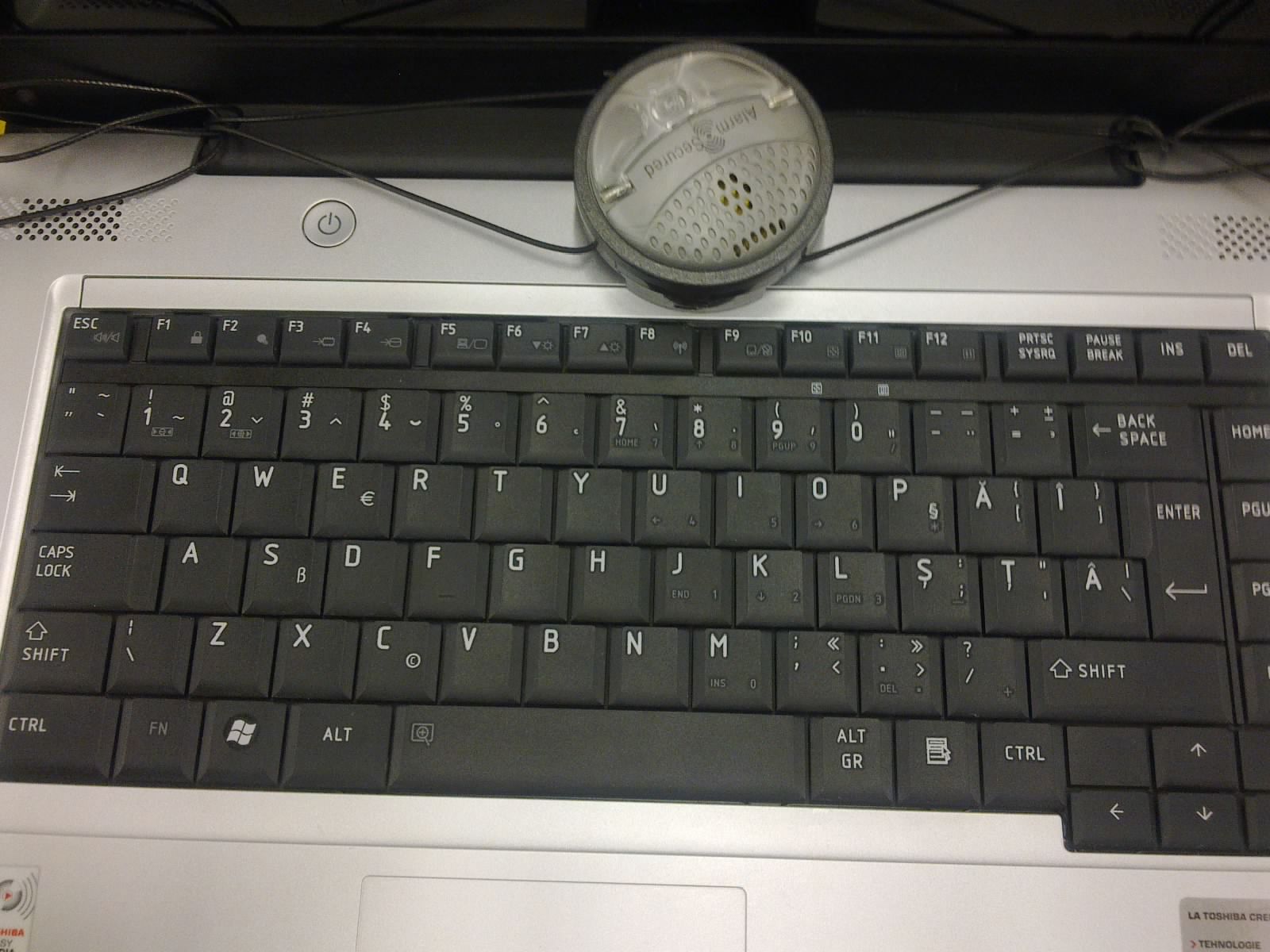
Cherry și Fujitsu/Siemens au produs tastaturi conforme standardului ASRO SR-13392:1998 și în 2011 te-ai aștepta să găsești tastaturi conforme standardului ASRO SR-13392:2004. Laptopuri cu tastaturi s-au mai văzut (Toshiba este singurul exemplu) dar tastaturi pentru PC... nț.

Am fost plăcut surprins să aflu că un producător de talie mondială - DELL - are o ofertă europeană completă de tastaturi, printre care și tastaturi „mioritice”.

Dell are patru tastaturi românești în ofertă:

Tastatura multimedia 580-13630 (QWERTY)  
Tastatura normală 580-14797 (QWERTZ)
Tastatura multimedia extra 580-14246 (QWERTY)
Tastatura normală 580-15060 (QWERTY)
Din păcate tastaturile au poze generice și nu se poate observa ce aranjament este folosit. Trei din ele menționează faptul că ar fi QWERTY - adică respectând noul standard. Singura metodă de a afla a fost să comand o tastatură.

Tastaturile pot fi comandate doar telefonic de la Dell, respectiv de la distribuitorii Dell din țara în care locuiți. Pentru Germania numărul de telefon este: 0 800 33 55 66 1, apelul fiind netaxabil. Teoretic o tastatură românească poate fi obținută în două săptămâni în orice țară în care Dell vinde calculatoare.

Am comandat tastatura normală 580-14797 (22€), dar deoarece în descriere era menționat faptul că ar fi aranjamentul vechi (QWERTZ), am schimbat comanda pentru tastatura multimedia extra 580-14246 (33€)

Din păcate aranjamentul este tot cel vechi, chiar dacă în descriere este menționată descrierea QWERTY, precum se vede din poza de mai jos:


În poză nu se observă cele două porturi USB, foarte utile când avem de-a face cu memorii portabile USB sau cu noile telefoane cu alimentare prin cablul USB.

Am contactat telefonic Dell și le-am comunicat faptul că există o problemă cu descrierea produsului. Din păcate Dell nu are în ofertă tastaturi cu noul standard. Vânzătorul a fost surprins să afle că aranjamentul oferit este vechi. Pentru necazul provocat Dell mi-a făcut cadou tastatura!

Am obținut gratis o tastatură de 33€, o tastatură de care nu am nevoie și sunt dispus să o donez cuiva căreia i-ar fi folositoare.

Producătorii de calculatoare ar avea de câștigat din vânzarea tastaturilor compatibile cu „Windows 7”, respectiv conforme standardului ASRO 13392:2004.

Dragi producători ne-am săturat de tastatura Microsoft „Legacy”!

P.S. Statele Unite ale Americii

Se pare că tastatura 580-14246 are un alt cod în Statele Unite ale Americii și anume W316D. Pe ebay se poate cumpăra o tastatură W316D la numai $19,95.

P.P.S. Alți producători

Și firma Lenovo, firmă care a achiziționat divizia de calculatoare de la IBM în anul 2005, are în ofertă tastaturi românești.

Oferta conține cinci tastaturi:
IBM Enhanced Performance USB Keyboard (Business Black) - Romanian 446 73P2644
ThinkPlus Preferred Pro USB Fingerprint Keyboard - Romanian 446 73P4754
IBM Enhanced Performance USB Keyboard (Business Black) - Romanian 096 73P2645
Lenovo USB Smartcard Keyboard - Romanian 51J0182
Lenovo USB Smartcard Keyboard - Romanian 51J0183

Tastatura ThinkPlus Preferred Pro USB Fingerprint arată astfel:

Putem doar specula faptul că „Romanian 446” vine de la standardul IBM KBD446.

Și firma HP are în ofertă cel puțin o tastatură românească, și anume „HP 2004 Standard Keyboad USB RO” DT528A#AKE. Se poate găsi la Amazon DE la prețul de 19,49€

Tastatura DT528A arată astfel:
Cu siguranță avem de-a face cu o tastatură „Legacy” deoarece în descrierea de pe pagina Amazon UK este menționat la sistemul de operare „Microsoft Windows 2000 / XP”.

Actualizare: (Sep 2013) HP are în ofertă începând cu Feb 2011 modelul HP 537746-271, se poate găsi la Amazon DE la prețul de 39€. Poza de pe Amazon DE arată exact la fel ca poza de mai sus  modelului DT528A#AKE.

Și firma Acer oferă tastaturi românești:

Keyboard Romanian 105-key USB KB.USB0B.073
Keyboard Romanian 105-key Wireless KB.RF403.057
Keyboard Romanian 105-key RoHS USB KB.KUS03.260
Keyboard Romanian 105-key Black USB KB.USB03.092
Keyboard Romanian 105-key Black PS2 KB.PS20B.005
Power Series SK50 KB.6880B.075

Aspire Z5600 KB.RF403.274
Aspire X3600 KB.KUS03.260

La tastaturile Acer nu am putut găsi detalii despre aranjamentul folosit, cel mai probabil avem de-a face de asemenea cu aranjamentul „Legacy”.

Actualizare:  firma Fujitsu are în ofertă o tastatură conformă cu standardul românesc, pentru mai multe detalii mergeți la: Tastaturi românești II.

2011-05-23

Android is the new Windows Mobile

Firstly please excuse me for stating the obvious. I've reached the above conclusion after seeing Android ports of two Windows Mobile programs.

Windows Total Commander has a beta version for Android. Total Commander for Windows Mobile is a nice addition to the native File Explorer, one feature I use often is the Registry Editor. On the desktop I use Total Commander daily, and I feel like missing one hand when I have to operate on desktops without it.

The second application with an Android port (and also an iPhone port) is Birdie Sync, which allows synchronization between your mobile phone and Mozilla Thunderbird / Sunbird.

It's nice to see that these applications are brought to life on a different platform. What Windows Mobile applications ported to Android have you encountered?

2011-05-04

Thank you Google!

Google has finally fixed the Droid font family with regard to Romanian language (reported as a bug here). The font family can be downloaded from here, and more information about the release can be found here.


What came as a surprise was the fact that Google Web Fonts had proper Romanian support for Droid font family. This was not the case in the past, and still not the case for other font families like Ubuntu (reported as a bug here)


Thank you Google! (I would have welcomed a comment in the bug report though)

P.S. Google Web Fonts are not yet updated to cope with Romanian language. The picture above shows what one should expect (also when the font is installed in the system), and below is what one will really get.

2011-02-27

Thank you Amazon!

In this post I'm focusing on Kindle for PC running on Windows XP and the Romanian language.

Windows XP has been able to display correct Romanian characters after Romania joined the European Union in 2007, and it can do this after installing the European Union Expansion Font Update.

Here is a screenshot of Kindle for PC 1.2.1 displaying a book on Windows XP:


Here is a screenshot of Kindle for PC 1.3.0 displaying the same book:


Noticed the squares? They are there because Amazon changed the font (which cannot be changed by user) from Times New Roman to Georgia. Unfortunately Microsoft has not included an updated version of Georgia in the "European Union Expansion Font Update".

Here is a list of options for fixing this squares problem:
  1. Upgrade from Windows XP to a newer Windows operating system
  2. Report the problem to Microsoft and hope for a new version of  "European Union Expansion Font Update"
  3. Report the problem to Amazon and hope for a new version of Kindle for PC

The first option is not always feasible due to old hardware or lack of budget for newer Windows operating systems.

The second option could have worked in 2007, but not in 2011. I'm saying this because the first version of "European Union Expansion Font Update" was dated 8 December 2006 and included font updates for Arial, Times New Roman, and Verdana families. The second version is dated 1 May 2007 which also added the Trebuchet font family to the updated font list.

The third seems the most "doable" of them all. And it was.

Here is a screemshot of Kindle for PC 1.4.1 running on Windows XP:


Amazon reverted the reading font to Times New Roman. Thank you Amazon for listening! (although feedback like "We fixed your problem in version x.y.z" would have been welcomed)

2011-02-09

Reusing bits

I was cleaning my projects directory and I have stumbled upon a small piece of code which I thought might interest others.

The small piece of code was about changing a private data member from outside the object, using normal C++, without using reintepret_cast or hacks like #define class struct


#include <iostream>

class Pi
{
    double pi_;
public:
    Pi() : pi_(3.1514f)
    {
    }

    double GetValue() const
    {
        return pi_;
    }
};

struct Pie
{
    double pie_;
};

int main()
{
    using std::cout;
    using std::endl;

    Pi pi;
   
    cout << "Pi: " << pi.GetValue() << endl;

    Pie* p = new (&pi) Pie;
   
    p->pie_ = 4.0f;

    cout << "Pi: " << pi.GetValue() << endl;
}

I have highlighted the line which does the trick. This trick is called placement new.

2011-01-18

Manifest this

In this blog entry I will talk about Visual Studio 2008 and the C runtime library.

Firstly we create a new Win32 hello world console application:

#include <iostream>

int main()
{
    std::cout << "Hello World" << std::endl;
}

The resulted hello.exe binary is 9KB large, and by using Dependency Walker we find that is dynamically liked to msvcp90.dll, msvcr90.dll, and kernel32.dll

One might think that in order to deploy this hello application you will only need msvcp90.dll and msvcr90.dll alongside the application, or to have them somehow installed in the system.

The latter option is preferred by most applications, you only need to install Microsoft Visual C++ 2008 Redistributable Package and that's it.

The redistributable package is 1.7MBytes in size, and is installed in c:\Windows\WinSxS directory, and it also includes MFC. But this is just a hello world application, surely we don't need to install MFC.

The good news is that you can copy from C:\Program Files\Microsoft Visual Studio 9.0\VC\redist\x86\Microsoft.VC90.CRT\ only msvcp90.dll, msvcr90.dll, and the funnily file named Microsoft.VC90.CRT.manifest. You don't need to copy msvcm90.dll because this is required for "Managed" C++ applications.

The manifest file is required because starting with Visual Studio 2005 the C runtime library (CRT) is packaged as Side-by-side Assembly. Applications need to have also a bit of magic in order to work with the new CRT namely the RT_MANIFEST resource embedded in the executable.

By using Resource Hacker we can take a peek at this RT_MANIFEST section:

<assembly manifestversion="1.0" xmlns="urn:schemas-microsoft-com:asm.v1">
  <trustinfo xmlns="urn:schemas-microsoft-com:asm.v3">
    <security>
      <requestedprivileges>
        <requestedexecutionlevel level="asInvoker" uiaccess="false"></requestedexecutionlevel>
      </requestedprivileges>
    </security>
  </trustinfo>
  <dependency>
    <dependentassembly>
      <assemblyidentity name="Microsoft.VC90.CRT" processorarchitecture="x86" publickeytoken="1fc8b3b9a1e18e3b" type="win32" version="9.0.21022.8"></assemblyidentity>
    </dependentassembly>
  </dependency></assembly>

I have highlighted the version of  the CRT used.

What happens if you decide to install Visual Studio 2008 SP1? You would expect that you should have a different CRT version. That was the case for Visual Studio 2005, Visual Studio 2008 uses the RTM version also when you install SP1, as described in this Visual C++ Team Blog article.

The size of the Microsoft Visual C++ 2008 SP1 Redistributable Package changed as well, from 1.7MB to 4.0MB due to MFC Facelift... Feature Pack and C++ TR1 inclusion.

In order to have the new CRT referenced one needs to set the following preprocessor define _BIND_TO_CURRENT_CRT_VERSION. After doing so the CRT version becomes 9.0.30729.1.

After Visual Studio 2008 SP1 there was another CRT update due to ATL Security Update, which bumped the CRT version to 9.0.30729.4148. This version is referenced in "c:\Program Files\Microsoft Visual Studio 9.0\VC\redist\x86\Microsoft.VC90.CRT\Microsoft.VC90.CRT.manifest"

So we have build our hello application with version 9.0.30729.1 and we distribute the CRT with version 9.0.30729.4148, which of course doesn't work in practice.

Others have encountered this problem and they have taken drastic measures like reinstallation of Visual Studio 2008 and/or manually change the CRT version in "c:\Program Files\Microsoft Visual Studio 9.0\VC\include\crtassem.h" header file.

Since these manifest files are xml files why not just change them using the manifest tool?

The following two commands extract and repack the RT_MANIFEST resource:
mt.exe -inputresource:hello.exe;#1 -out:hello.manifest
mt.exe -outputresource:hello.exe;#1 -manifest hello.manifest

Now there is the issue of replacing "9.0.30729.1" to "9.0.30729.4148" in hello.manifest and since sed is not present on a normal Windows machine I have created a Javascript script which does this task, which is called like this:

cscript.exe replace_string.js hello.manifest "9.0.30729.1" "9.0.30729.4148"

This way we can update the CRT files without having to wait for Visual Studio to catch up.

They say Visual Studio 2010 has addressed the whole manifest nightmare and one can copy the CRT files alongside the executable file without any hacking.

2011-01-06

ActiveX <video> controls

The recently released OpenCodecs release, beside fixing bugs and updating audio and video codecs libraries adds support for "controls" attribute in the ActiveX <video> player.

Without further ado here is a video showing this feature:


The ActiveX <video> player uses DirectShow to render an URL. The DirectShow "File Source (URL)" filter downloads a file from beginning to the end and it doesn't support seeking until has downloaded the whole file. This behavior is unfortunate and I hope I can fix this by writing my own "File Source (URL)" filter.

The above video presents a Theora video, which at first it has 0:00 length and then it has the right duration. This is due the fact that the current DirectShow Ogg demuxer needs to have access to the whole file in order to build the seeking table, the ActiveX player knows when the download is completed and builds the seeking table at the end. WebM should not have this limitation.

The UI was borrowed from Firefox and I've used GDI+ to draw the controls. I hope to use Cairo in a future version, in order to have prettier controls and to share it with the Kate subtitles decoder.

This should make the ActiveX player a bit more usable. In the next version besides having a new URL source filter I plan to add scripting support in order to control the ActiveX player from JavaScript code.

2010-11-17

Die Deutschen


A nice way of spending GEZ money, these subway ads were funny :)

2010-10-30

(ro) Diacriticele și internetul

În articolul „Browsere Moderne” am testat comportamentul browserelor (Internet Explorer, Mozilla Firefox, Google Chrome, Opera, Apple Safari) la afișarea paginilor web care conțin caractere (ș și ț cu virgulă) neexistente în fonturile din sistemul de operare Windows XP.

Internet Explorer 6 a afișat pătrățele. Celelalte browsere au substituit fontul care nu conținea caracterele dorite cu alt font care conținea caracterele, dar această substituție se observă ușor și nu arată foarte bine.

În articolul „Browsere Moderne II” am folosit o altă abordare, am încercat să afișez pagina cu alte fonturi decât cele existente în sistemul de operare Windows XP.

Toate browserele (inclusiv Internet Explorer 6) au afișat corect paginile web. Dezavantajul la această abordare este gama foarte restrânsă de fonturi ce pot fi utilizate în acest fel și care să conțină diacriticele românești, la care se adaugă și timpul de descărcat fonturile de pe internet.

Se spune că a treia încercare este cu noroc, în acest articol voi prezenta o modalitate de afișare a paginilor web cu diacriticele corecte, având posibilitatea de a afișa diacriticele cu sedilă pe sistemele de operare fără fonturi actualizate.

Soluția este simplă, la încărcarea paginii se detectează dacă șirul "șȘțȚ" are aceeași lățime cu șirul "sStT", dacă au aceeași lățime nu se face nicio modificare a paginii, dacă nu atunci se înlocuiesc toate diacriticele cu virgulă cu diacriticele cu sedilă. Diferența de lățime vine de la faptul că șirul cu diacritice este înlocuit fie cu pătrățele (Internet Explorer 6), fie este substituit cu alt font (restul browserelor).

Această soluție funcționează pentru fonturile cu lățime variabilă, fonturile cu lățime fixă (ex. Courier New) nu pot fi folosite deoarece fiecare caracter are aceeași lățime.

Pentru ca o pagină web să poată folosi acest sistem de siguranță sunt necesari următorii pași:

  • pagina web trebuie să fie codificată unicode utf-8
  • diacriticele folosite trebuie să fie cu virgulă
  • adăugarea unei singure linii de cod în secțiunea <head>, linia de cod indică calea la scriptul Javascript care face toată magia

Exemplu (aici diacriticele au fost trecute sub formă de cod hexazecimal):

<html>
<head>
<meta http-equiv="Content-Type" content="text/html; charset=UTF-8" />
<script type="text/javascript" src="diacritice.js"></script>
</head>
<body>
    <p>Muzicolog&#x103; &#xee;n bej, v&#xe2;nd whisky &#x219;i tequila, 
     pre&#x21b; fix</p>
</body>
</html>

Pagină de test: http://goo.gl/AwMKY, codul sursă al paginii web, și al scriptului Javascript. Mai jos am pus capturi de ecran ale unui sistem Windows XP: fără script, cu script dar fără fonturi actualizate și cu script și cu fonturi actualizate:

Fără scriptul diacritice.js
Cu scriptul diacritice.js dar fără fonturile actualizate
Cu scriptul diacritice.js și fonturile actualizate
Un alt exemplu ar fi chiar acest blog. Configurarea am făcut-o astfel: în interfața Blogger am mers la "Design", apoi la "Edit HTML", unde conținutul scriptului diacritice.js (în locul celor trei puncte) l-am pus deasupra lui </head> sub forma:

<script type="text/javascript">
//<![CDATA[
...
//]]>
</script>

Am testat cu sucess soluția pe următoarele browsere:

  • Internet Explorer 6.0, 7.0, 8.0
  • Mozilla Firefox 3.6.12
  • Opera 10.53
  • Apple Safari 5.02
  • Google Chrome 7.0
Soluția prezentată este ușor de folosit, beneficiază de suportul adus pentru limba română de sistemele de operare Windows Vista și Windows 7 și menține în același timp compatibilitatea cu veteranul Windows XP.

P.S.

Am făcut o serie de teste și pe Ubuntu 10.10 Maverick Meerkat pe următoarele browsere:

  • Mozilla Firefox 3.6.12
  • Opera 10.53
  • Google Chrome 7.0
Mozilla Firefox și Opera au afișat pagina cu diacriticele corecte, Google Chrome a afișat pagina cu diacriticele cu sedile.

Aceasta se datorează faptului că Google Chrome folosește fontul „Times New Roman” ca font implicit pe Linux, font care nu face parte dintr-o distribuție de Linux. Am raportat problema la Google aici - Issue 61366.

În atenția utilizatorilor care instalează pe Linux pachetul de fonturi corefonts pentru a avea o experiență asemănătoare cu cea oferită de sistemul de operare Windows.

Toate fonturile din pachetul corefonts nu conțin diacriticele corecte, fapt care va face din sistemul Linux (Ubuntu 10.10 este nou nouț la data scrierii acestui articol) un Windows 98 și soluția din acest articol va converti toate diacriticele cu virgulă în diacritice cu sedilă!

P.P.S.

Am actualizat scriptul pentru cazul în care avem de-a face cu fonturi care au parțial diacriticele corecte: ș cu virgulă, dar fără ț cu virgulă, dar ț-ul cu sedilă fiind implementat ca ț cu virgulă. În acest caz numai ț este schimbat în varianta cu sedilă.

Android folosește familia de fonturi Droid care intră în categoria de fonturi descrisă mai sus.

Droid nu este singura familie de fonturi care suferă de această „anomalie”, la Google Font Directory am mai întâlnit familiile de fonturi: GFS Didot, GFS Neohellenic, Josefin Sans Std Light și Reenie Beanie.

2010-10-27

MSDN Subscription Donation

I would like to thank Mozilla for buying me a MSDN Subscription license, with this license I will have access to a lot of Microsoft software.

Activating a MSDN subscription is harder than one might think especially when you try to activate it on a different continent than the one where the subscription was bought.

Thank you Mozilla!

2010-10-22

Menus

After playing a bit with Firefox 4.0b6 I have noticed that something was different in the new Firefox, and that was caused by the font rendering used in the UI.

I know that Firefox is using Direct2D to render the UI on Windows 7, but in this area is not necessarily a step forward, and I hope that there is something to be done in this aspect (I have already given feedback using the build in feedback system)

I have made screen shots of Firefox 3.6 vs Firefox 4.0b6:


I have also done screen shots of Internet Explorer 8 vs Internet Explorer 9beta:


Notice that Internet Explorer 9 doesn't seem very different than Internet Explorer 8. I'm not sure that they did a better job at using Direct 2D than Firefox because they might not use Direct2D for menus all together.

This reminds me how broken was text rendering in WPF applications, but Microsoft seems to have fixed that in WPF4, see this blog entry about Visual Studio 2010

Also worth mentioning is that I have used the latest NVidia drivers for my graphics card:


Edit: This behavior was reported as bug #594325

2010-10-17

SSL, Certum SSL

For the past year we at Xiph have been using a SSL certificate for the following subdomains: svn, git, and trac.

The SSL certificate was kindly given to us by Certum at no cost.

Usually users do not notice that the SSL certificate is in place, unless the SSL certificate is not recognized by the web browser, which will complain that the web site is not safe to browse.

I would like to thank Certum for allowing us to have non scary user experience while browsing our web servers.

Edit 25.10.2010 The offer was valid for one year, this year we did not get the
renewal.

2010-09-21

(ro) Diacritice pe HTC Leo

De curând am intrat în posesia unui telefon HTC Leo (zis și HTC HD2), telefon care are ca sistem de operare Windows Mobile 6.5.

Windows Mobile 6.5 nu poate afișa corect diacriticele românești, în special ș și ț cu virgulă. La introdus diacritice de la tastatură HTC HD2/Leo permite introducerea lui â, î, ş și ţ (varianta cu sedilă), dar lipsește ă.

Diacriticele se introduc după ce se ține apăsată tasta a, i, s, respectiv t, după care se aleg din meniul prezentat. În practică mie mi s-a părut destul de greoi să țin apăsată tasta și apoi să aleg din meniu.

Pentru a repara problema afișării diacriticelor am făcut un cab cu fontul Droid, font care este oferit de Google sub o licență care permite redistribuirea liberă. Fontul original Droid duce lipsa lui ț, am folosit o variantă modificată.

Pentru problema introducerii diacriticelor am făcut un cab cu modificări aduse aranjamentului de taste implicit (două fișiere xml, unul pentru modul portret și unul pentru modul peisaj). Diacriticele se introduc direct ținând apăsat tastele a, q, i, s, t.

Numerele și restul de simboluri care se introduceau în mod direct ținând apăsat tastele sunt accesibile din meniu. Am adăugat în mod implicit simbolul € pe tasta f, simbolul $ este accesibil din meniu.

Rezultatul se află în captura de mai jos:


Caburile se află aici: DroidFonts.cab, respectiv htc_leo_keyboard.cab. Ar mai fi de menționat faptul că este necesar un restart al telefonului, că s-ar putea să meargă doar pe HTC Leo și că nu funcționează cu T9.

Edit Am făcut o nouă versiune de htc_leo_keyboard.cab, versiune care nu mai are caracterul "â" și pe tasta "a" (în modul portret nu mai încăpea meniul pe ecran). De asemenea am inversat $ cu € pe tastatura numerică.

Spor la tastat.

2010-09-02

DirectX Error Lookup

DirectShow is a COM based technology. COM uses for error reporting the (in)famous HRESULTs.

These HRESULTs are numbers like 0x80040227, but what do they mean? Visual Studio has a nifty MFC utility called "Error Lookup". But what happens if you lookup 0x80040227? "Message not found" pops up.

It seems that the DirectShow HRESULTs are out of reach for "Error Lookup". "Error Lookup" has a button named "Modules", maybe we can add the DirectShow HRESULTs there.

After adding "QUARTZ.DLL" in "Error Lookup" module list, 0x80040227 becomes "The operation could not be performed because the filter is in the wrong state." Sometimes the trick of adding quartz.dll doesn't work, then what?

DirectX has some nice error lookup functions named DXGetErrorString and DXGetErrorDescription, which give information about DirectX components and Win32 functions.

I have made a small tool called dxerr (source code here) which makes use of the two functions.

You might be tempted to use these two functions in your programs, but note that these functions might increase your binary with a couple of hundred kilobytes, and you need to have the DirectX SDK installed.

With the use of dxerr 0x80040227 has also a name: VFW_E_WRONG_STATE, which you might have found out by doing a Google search.

Here is a screenshot displaying "Error Lookup" and "dxerr".


After creating the "dxerr" tool I've found out that there is a tool named "DXErr.exe" in the DirectX SDK under "Utilities\bin\x86". I had no idea about that, but now that I know about it, it doesn't make a big difference :)

dxerr can be of use to those who do not have the DirectX SDK installed, to those who program with other programming languages than C++, or to those who program using C++ but with a compiler from a different vendor.

2010-08-04

OpenCodecs, WebM, and Windows Mobile

Over a month ago I have released the first version of OpenCodecs. OpenCodecs is the new name of the OggCodecs DirectShow package after the addition of WebM codecs.

OpenCodecs was the first release to have an unified 32/64 bit installer package, the 64 bit components are installed only if the operating system is 64 bit.

Today I have released a new OpenCodecs version, one for Windows Mobile 5.0 - 6.5. This is only a decoder package and WebM/VP8 decoders are not present.

Seeking is also disabled for Ogg Vorbis, Theora and Speex, due to the way the seeking table is build (at beginning, reading the whole media file), which turns to be very slow on Windows Mobile.

On my Palm Treo Pro (which is actually a rebranded HTC) the default video renderer "HTC DX Renderer" does not work with Theora, I had to change it with the Microsoft "Video Renderer" to have Theora working.

This was done by changing the filter merit in Registry. I have used Total Commander for this task (it has a Registry editor) and View Graph to test which filters actually work (this is the Windows Mobile version of GraphEdit)

I have made a recording showing "Big Buck Bunny" running on my Palm Treo Pro:


This version doesn't have any arm assembly optimizations for Vorbis, Theora, and for yuv2rgb conversion. My test video had a resolution of 320x180 (Palm Treo Pro has a 320x320 display) and I do not know how well it works with higher resolution video files.

Edit: In case you were thinking at changing the video renderer's filter merit, here is what you need to look after (beware that you might experience sudden system reboots):

Palm Teo Pro:
[HKEY_CLASSES_ROOT\CLSID\{70e102b0-5556-11ce-97c0-00aa0055595a}]
@="Video Renderer"
"Merit"=dword:00800000

[HKEY_CLASSES_ROOT\CLSID\{016229F3-158F-4a0a-8656-85F894F1405D}]
@="HTC DX Renderer"
"Merit"=dword:00800100

HTC Touch Pro 2:
[HKEY_CLASSES_ROOT\CLSID\{70e102b0-5556-11ce-97c0-00aa0055595a}]
@="Video Renderer"
"Merit"=dword:00800000

[HKEY_CLASSES_ROOT\CLSID\{1ADAFBDB-2E09-447f-94C4-39B195860BC6}]
@="HTC DDR(VO)"
"Merit"=dword:00800005

You will have to swap the merits for those two filters. Normally Theora should also work with HTC Video Rendrers, but at the moment I do not know how to make them work.

I'm planning (if I get my US visitor visa) to go to Open Video Alliance, and FOMS in October.

I have put a Donate button (orange button on the right side) in the hope of financing the trip to New York for my wife.

Thank you for your support and enjoy this OpenCodecs release.

2010-05-16

rOGG on!

The "rOGG on!" title was borrowed from the FSFE campaign: Radio stations granted awards for using Open Standards. I think FSFE should also "boo" radio stations which drop support for Open Standards (Radio Swiss Jazz used to have a Vorbis stream)

In a previous blog entry I was presenting a technical preview of the HTML5 <video> tag running on Internet Explorer. That version worked only in
a few controlled cases.

I have released a new Xiph.Org Ogg Codecs version (grab it from here) which makes the technical preview of the HTML5 <video> tag a bit more useful.

In this version I have dropped the custom file/network reading code and now I rely on built in DirectShow filters to provide the same (better) functionality. Now one can listen to Absolute Classic Rock behind a network proxy using Windows Media Player.

Here are the improvements to the HTML5 <video> tag:
  • URI support given by uriparser library
  • VMR9 support (instead of VMR7), this requires DirectX9
  • Internet Explorer Standards mode support, instead of just Quirks mode
  • width and height basic attribute support
Here is a modified "Patent Absurdity" web page, to give it a try.

I have made a screen cast to illustrate the new features (better viewed full screen):

The wallpaper picture was taken in the beautiful island of Burano

I would like to thank Philip Jägenstedt for his contribution, which speedup this release.

2010-04-29

Browsere Moderne II

În articolul Browsere Moderne am testat comportamentul browserelor Internet Explorer, Firefox, Chrome, Opera, Safari în privința randării textului folosind caractere (ș și ț cu virgulă) care nu se află în fonturile instalate în sistemul de operare (Windows XP).

Rezultatele nu au fost foarte bune, caracterele lipsă arată corespunzător dar nu se integrează cu restul textului.


În acest articol voi testa browserele folosind pagini web conținând fonturi stocate pe server (înglobate), fonturi care conțin caracterele ș și ț cu virgulă. Am ales familia de fonturi "DejaVu Sans" deoarece poate fi distribuită liber (familie de fonturi folosită pe sistemul de operare Linux, distribuită și în suita de software birotic "Open Office")

Un font poate fi înglobat într-o pagină web folosind directiva CSS @font-face. Toate browserele suportă fonturile în format „TrueType (.ttf)”, excepție făcând Internet Explorer care suportă formatul „Embedded OpenType (.eot)”. Am convertit fonturile din formatul „TrueType” la formatul „Embedded OpenType” folosind ttf2eot. Un exemplu de cum se folosește @font-face se găsește aici.

Paginile de web folosite la testarea browserelor sunt: pangrama (codată UTF-8), pangrama-latin10 (codată ISO-8859-16), respectiv versiunile pentru Internet Explorer: pangrama-ie și pangrama-ie-latin10

Rezultatele obținute pe sistemul de operare Windows XP SP2, fără fonturi actualizate, și fără a avea familia de fonturi „DejaVu Sans” instalată local în sistemul de operare sunt:
Resursele folosite pentru aceste teste se găsesc aici.

Toate browserele de mai sus afișează pagina codată UTF-8 perfect, pagina codată ISO-8859-16 este afișată incorect doar de către Internet Explorer.

Internet Explorer începând cu versiunea 7 suportă codarea ISO-8859-16, dar din păcate parțial. Am raportat problema la Microsoft #554861 - ISO-8859-16 codepage support.

Un dezavantaj al fonturilor incluse în pagina web poate fi mărimea lor (aproximativ 3 Mbytes), deoarece trebuie descărcate de pe server la accesare. Acest dezavantaj poate fi redus prin stocarea fonturilor, de către browser, pentru accesări ulterioare.

Am arătat că se pot afișa pagini web, care conțin diacriticele corecte, pe sistemul de operare Windows XP, singura condiție este ca utilizatorul să ruleze un browser care suportă directiva CSS @font-face. Aici găsiți o listă cu aceste browsere.

Actualizare Google a lansat serviciul Google Font Directory, serviciu care oferă fonturi pentru „toată lumea”. Tehnic @font-face este folosit, dar indirect, sub o formă care merge pe toate browserele.

Am făcut pagini de test pentru toate fonturile din Google Font Directory, din păcate foarte multe dintre ele au probleme cu diacriticele. Puteți vota pentru sugestia făcută de mine, poate Google va lua măsuri și va repara problema cu diacriticele.